1. Before You Begin
1.1. About
This document is intended for enterprise developers who wish to integrate maya.ai Choice API into their digital channels or build 'Taste Enabled' choice applications.
1.2. What to expect
This document will provide you with a basic walkthrough of the maya.ai API and the key concepts required for successful integration into any digital channel.
1.3. Prior Knowledge
This document assumes you are clueless as it comes to maya.ai and hence, will bring you up to speed with the basics you need to get started. At the same time, we do assume you are experienced in consuming online REST APIs in whatever your favourite development environment is. If you are not, please look it up online as it is beyond the scope of this document.
2. About Our maya.ai
We live in an age whereby choices are available everywhere. In fact too many of them… Did you know that if you are presented with more than 6 or less than 4 choices you are likely to have a hard time making a choice? It is even likely that you will postpone the decision. Compound that with the Google results page on each and every search you do. Page after page of information that you simply can’t process. Haunting. Isn’t it? This is why we built maya.ai.
maya.ai is the name of our product. You will be using maya.ai as a set of APIs. This is what you need to know about it. For now…
maya.ai is the only choice engine globally which is centred around 'Taste'. It is powered by a global Taste Graph that allows connecting various objects by taste. To give you an idea: Our Taste Graph knows about every digitally discoverable restaurant on this blue planet and connects them all to each other by taste. Pause! pick two distinct restaurants that are completely not related and appreciate the fact that we actually scored how closely these two are related by the taste of people. We think it’s awesome!
Next big piece of maya.ai is the ‘Maestro’, the Choice.AI engine. It has numerous taste algorithms orchestrated in real time (also in batches) working for maya.ai’s choice engine, the Choice.AI. It provides you with the best set of lifestyle choices to showcase on your application.
maya.ai recommended choices perform better with customer response on almost every aspect that you can imagine. This is because maya.ai is trained to balance between ‘discovery’ and ‘reinforcement’ (of behaviour) when selecting the right mix of choices to present. It also cleverly knows how to predict as well as optimise the best choices for a specific objective (like I want to surprise people by the choices I present, or I want to make sure they simply take it by feeling comfortable).
Our choice engine Choice.AI is built with machine learning technology embedded. So, you can be rest assured that with the loopback mechanism we introduced, maya.ai will serve not only the best choices from the get go, but maya.ai will also be able to learn and respond to the slightest clues customers can provide. Implicit; like page view, time spent on a page etc. or explicit; like adding something to the favorites.
When you get to read this, most of the heavy lifting is already done. The relevant data has been provided to maya.ai; maya.ai has already processed and calculated taste fingerprint used to guide the choices it issues to each and every customer.
maya.ai is crafted with Love @ Singapore and Chennai, India.
We hope you enjoy this read.
- The maya.ai Product Team
3. Overview
By the end of this document, you should be able to know exactly what you need to do to get your application to showcase maya.ai recommended choices and how to engage customers with campaigns targeted by taste.
The getting started section will help you make sure you have everything you need and also cover one important piece of terminology. Then, we will cover the main data model leading to examples.
The API reference is best used when actually getting into development. Easy to come back to the documentation.
We also did our best to include an effective FAQ list. For any recommendations please drop us a line at support@crayondata.com.
4. Getting Started
Before you begin let’s get you setup with the basics.
4.1. Setup up your Swagger
We use Swagger to provide you with interactive API and more documentation. Access to Swagger UI should be provided to you by your project manager once your maya.ai Choice API is all setup and ready for action.
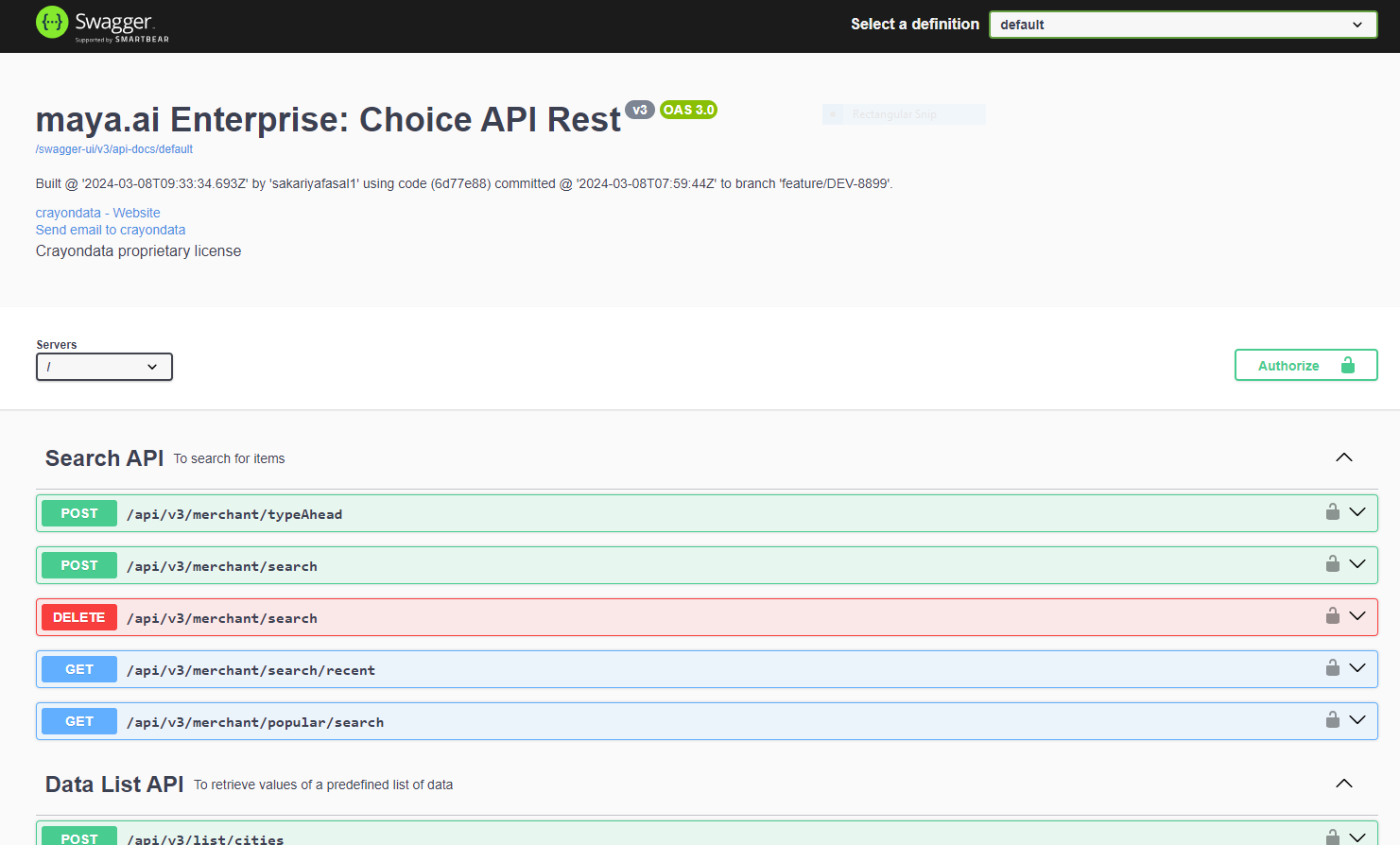
Once you get the link, follow one of the two approaches to authorize for access:
API Key based authentication :
. Along with the API Link you should get an API key
. Go to the swagger ui and click on 'Authorize' button on the top right corner
. Enter the API key provided in the 'api_key' text box
. Click on the ‘Authorize’ button to complete
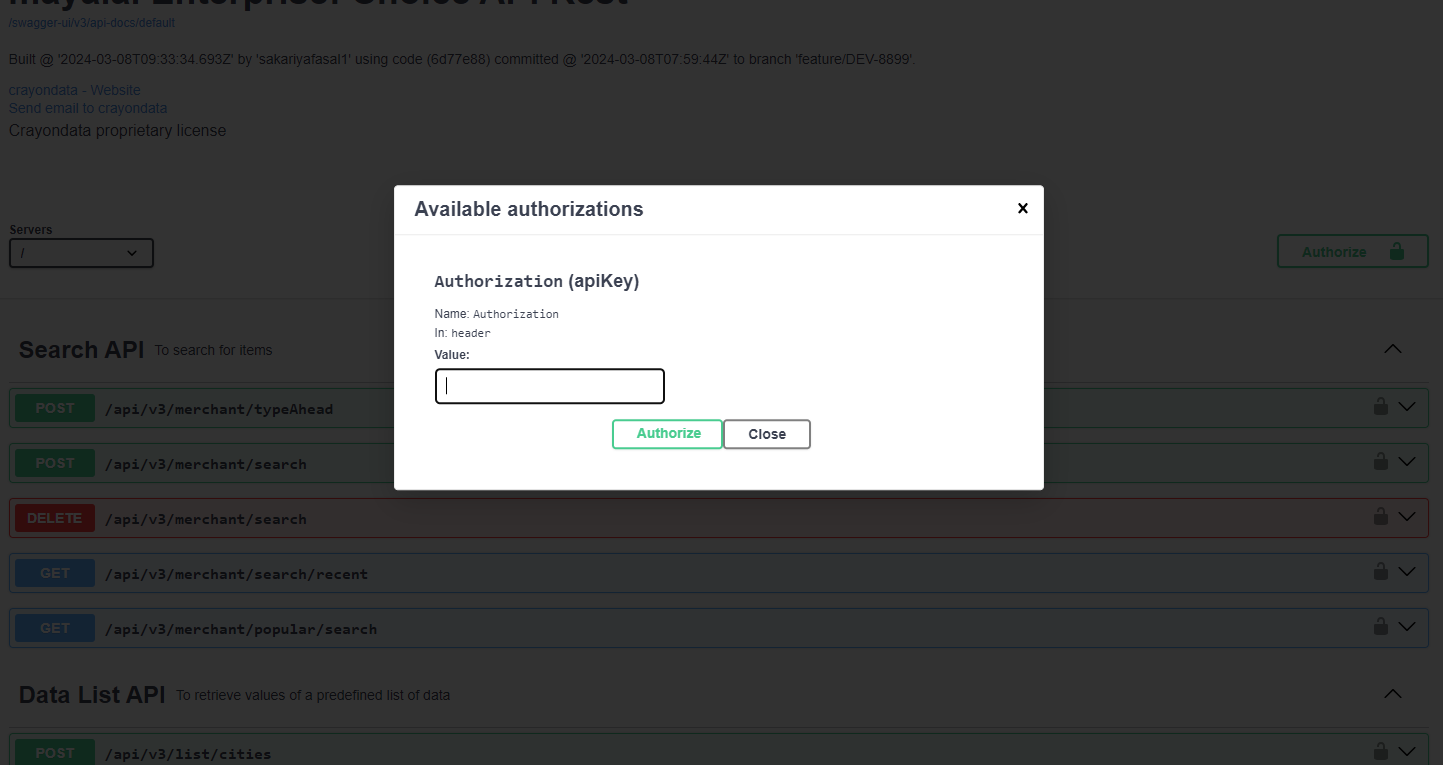
That’s it, now you should be able to get access to the maya.ai choice API online documentation.
To make sure you are all good to go, simply test this in your browser.
In Swagger UI, expand 'Data List API' and select '/api/v3/list/{id}' and key in inputs as below:
'id' |
cities |
You should be getting something like this:
{
  "id": "list-cities",
  "description": "List of available cities",
  "items": [
    {
      "label": "Abu Dhabi",
      "value": "Abu Dhabi"
    }

    ...
  ]
}
5. Key Concepts
5.1. Boundaries
maya.ai Choice API does one thing well. It gets you the best set of choices to present to your users based on the context with which you have consumed the APIs and basis the set of filters you apply. That’s it. To make sure bounties are clear, and you do not misuse maya.ai to other ends.
maya.ai does not manage your application state.
maya.ai does not handle complicated state reconciliation.
maya.ai does not manage your user profile.
maya.ai lists the best choices to be presented during a given session.
maya.ai is obsessively collecting taste signals to serve better and better choices.
What is BEST CHOICES? Or BETTER CHOICES?
The quality of choice is measured by the response triggered by the customer and the level of trust you build by presenting things that may be new to them, but still relevant. This is all that maya.ai does.
5.2. Managing User Identity
maya.ai operates on an anonymized userId or a UUID auto-generated at the client application(web or mobile app) to identify a unique user.
User Access Token:
It is mandatory for each and every API call to include this token and is essential for getting the correct relevant choices for your user. The client application should make sure to manage the user identities it uses to retrieve choices from maya.ai Choice API.
It can be obtained in two ways as follows,
5.2.1. API-Key based authentication
|
The user access token must be a device ID or a UUID having a length of 36 characters of the following format: xxxxxxxx-xxxx-xxxx-xxxx-xxxxxxxxxxxx where x is a hexadecimal digit. Eg. 7faeba52-9217-40db-9def-af9c80fedc47 |
5.3. Choices
Choices are a set of selections that can be presented to a user. This can include and is not limited to Restaurants, Stores, Brands, Offers, Products etc.. maya.ai focuses on lifestyle choices.
The abstract form of a choice resembles a promotion or a product. It may have a title, description, image, an offer (discount), address, contact number etc..
Choices will be tagged with an id to help keep a reference of them. It is advised you do not cache choice lists or specific choice id and always rebuild your application state on application startup.
5.4. Interactions
We already mentioned that maya.ai is enabled with machine learning engine, Choice.AI. While maya.ai learns implicitly (like Google) by the nature of the activity over the API, Application must also report back to maya.ai on key users interactions. This loopback makes sure that maya.ai is up-to-date with the taste preferences of the users.
This API has no desire to manage the user profile. It is up to you. However, the interactions of the user must be reported to maya.ai.
Below is the list of possible interactions.
LIKE |
User likes a choice (Add to favorites) |
UNDO_LIKE |
User un-likes a choice (Remove from favorites) |
WISHLIST |
User wishlists a choice |
UNDO_WISHLIST |
User removes wishlisted choice from wishlisted list |
DISLIKE |
User does not like a choice |
VIEW |
User viewed choice details |
SEARCH |
User searched for a choice |
BUY |
User bought a specific choice presented |
CLAIM |
User claims an offer which is present as part of choice item |
Clearly, your applications may not implement all of the above interactions, however, if you are presenting choices to your users, making sure that favourites are included in you application design is strongly recommended. In case your product manager decides against it, you can still use the VIEW interaction as a fallback.
There is no such thing as over-communicating. Let maya.ai handle the noise and make sure to direct any piece of interaction to maximise your application performance.
Here is a simple guide to follow: If you have doubt if you should report an interaction or not, you probably should. Simple.
5.5. Campaigns
Campaigns are themed group of choices that may be made available to some users at some period of time. An example could be ‘Christmas Special’ offers provided to all user from Dec 1 - Dec 31 or ‘Summer Vacations’ made available only to the customer who like to travel during summer (depending on where you are on the globe.)
Applications should check to see on startup if there is a campaign the specific user is eligible for. Once identified, the application can retrieve and render the information required around the specific campaign. Campaigns are denoted by 'campaignToken' and 'knownUserId' in the Choice API.
Note that at any given point of time, users may be eligible to some campaigns and at times to none. The list of campaigns is not really limited to a specific number per user, but please do put in place the correct measures to accommodate more if needed around the UX you design.
5.6. Filters
maya.ai Choice API allows you to reduce the number of choices the API returns. We recommend always to set the number of choices you retrieve to 18 (see note). However, you can actively ask maya.ai to provide you with the best choices for dining in a specific location, a specific city or serving a specific cuisine. This is accomplished with filters.
When submitting your POST request to get choices, the body of your REST request will carry a ChoiceRequest json that will describe what filters you wish to apply on the request.
These filters may include filter choices to a specific country (in case you have international coverage) or even to a GeoCode level. There are more filters (check the API documentation)
The term filter is specifically used as maya.ai will always work against an infinite list of choices, ranked and ordered by the user’s taste. Filter essentially removes the ones that do not match the filter criteria and retains the respective rank ordering with respect to the user taste.
When choices are returned, they are always listed by their taste relevance to the user. We call that taste relevance the 'Taste Affinity' of the user.
When displaying the choices in an order different from that returned by maya.ai, you are actually showing less relevant choices to the user. This is more than valid in certain use cases (e.g. client side sort), but consider presenting the choices in the order maya.ai provides most of the time.
6. Examples
Here are some simple examples for common tasks you would like to accomplish and include in your project.
6.1. Common APIs
6.1.1. Example 1: Get Campaigns
Get the list of campaigns
In Swagger UI, Expand 'User Profile and Campaigns' and select '/api/v3/user/campaigns'.
| Name | Description |
|---|---|
|
User access token |
|
Client asset identifier |
| Parameter | Description |
|---|---|
|
Known user identifier |
|
Flag to filter only hero campaigns |
|
Applicable offer source |
|
User’s city |
|
User’s latitude |
|
User’s longitude |
|
Category filter (default: all) |
|
Number of items to be returned (default: 10) |
|
Language (default: en) |
|
Request timestamp in ISO-8601 format |
| Path | Type | Description |
|---|---|---|
|
|
Whether an error occurred |
|
|
List of campaigns returned |
|
|
Unique identifier of the campaign |
|
|
Display name of the campaign |
|
|
Description of the campaign |
|
|
Type of campaign (e.g., MANUALLY_CURATED) |
|
|
Sub-type of campaign (e.g., OFFER_MERCHANTS) |
|
|
Whether this is a hero campaign |
|
|
Whether this is a banner campaign |
|
|
Whether it is either a hero or banner campaign |
|
|
Whether the campaign is currently active |
|
|
Whether the campaign applies to all users |
|
|
Whether to hide the campaign on the home page |
|
|
Client applicability (e.g., LIFESTYLE) |
|
|
External system identifier for the campaign |
|
|
Campaign start date-time (ISO-8601) |
|
|
Campaign end date-time (ISO-8601) |
|
|
Creation timestamp (ISO-8601) |
|
|
Last updated timestamp (ISO-8601) |
|
|
Cities where the campaign is applicable |
|
|
List of client asset IDs applicable for this campaign |
|
|
Image URLs for the campaign |
|
|
Default (web) image URL |
|
|
Thumbnail (mobile) image URL |
|
|
Map of item IDs to their campaign score/rank |
|
|
Score/rank assigned to the campaign item |
Key in inputs as below:
GET /api/v3/user/campaigns?category=all&heroCampaign=true&lang=en&city=Chennai&servedAt=2026-09-24T13:49:18.809Z HTTP/1.1
Content-Type: application/json
User-Access-Token: 04025959-b191-38f9-9e3f-924f0940515f
client-asset-id: WEB_APP
Host: localhost:8080
where 'User-Access-Token' is a UUID generated at client side(or a device ID) representing an user +
And you should be getting output as below:
HTTP/1.1 200 OK
Content-Type: application/json
Content-Length: 1133

{
  "campaigns" : [ {
    "bannerCampaign" : false,
    "images" : {
      "default" : "https://dpimages.crayondata.com/high-res-image/dev/camp_Default1787232012344.jpeg",
      "thumbnail" : "https://dpimages.crayondata.com/high-res-image/dev/camp_Thumbnail1787232014583.jpeg"
    },
    "campaignType" : "MANUALLY_CURATED",
    "heroCampaign" : true,
    "cities" : [ "all" ],
    "allUsers" : true,
    "applicableForClient" : "LIFESTYLE",
    "created" : "2026-08-20T13:20:15.271Z",
    "heroCampaignOrBannerCampaign" : true,
    "campaignItems" : {
      "9e99fdbb-dd61-3265-9c87-690a09744973" : 0.0,
      "ed3a3cfb-eeef-3071-84e3-3e58c26d72c0" : 0.0
    },
    "description" : "",
    "externalId" : 900237,
    "active" : true,
    "hideOnHomePage" : false,
    "howToAvail" : "",
    "endDateTime" : "2026-09-30T23:59:59Z",
    "termsAndConditions" : "",
    "lastUpdated" : "2026-08-21T04:46:40.909Z",
    "startDateTime" : "2026-08-21T00:00:00Z",
    "campaignSubtype" : "OFFER_MERCHANTS",
    "name" : "campagn test for empty merchant",
    "id" : "900237",
    "clientAssetIds" : [ "WEB_APP" ]
  } ],
  "error" : false
}
6.1.2. Example 2: Get choices for specific category and list type
Get choices for specific category and list type
In Swagger UI, Expand 'Choice API' and select '/api/v3/choice/list'
| Name | Description |
|---|---|
|
User access token |
|
Client asset identifier |
| Path | Type | Description |
|---|---|---|
|
|
Client identifier |
|
|
Known user identifier |
|
|
Anonymous user identifier |
|
|
Campaign identifier |
|
|
Category filter (default: all) |
|
|
User location details |
|
|
City name |
|
|
City name in Spanish (if available) |
|
|
List of choice list types to be fetched |
|
|
Type of choice list (e.g., BIGBRANDS, RESUME, TRENDING) |
|
|
Optional filters for this list type |
|
|
Optional sort criteria for this list type |
|
|
Total number of items to be returned |
|
|
Number of campaigns to be returned |
|
|
Language (default: en) |
|
|
Flag to include campaigns in response |
|
|
Flag to include offers in response (default: true) |
|
|
Request timestamp in ISO-8601 format |
|
|
User timezone |
|
|
Applicable offer source |
| Path | Type | Description |
|---|---|---|
|
|
HTTP-like status code of the response |
|
|
Response message describing the result |
Key in inputs as below:
POST /api/v3/choice/list HTTP/1.1
Content-Type: application/json
User-Access-Token: testuser
client-asset-id: WEB_APP
Content-Length: 521
Host: localhost:8080

{
  "clientId" : null,
  "knownUserId" : null,
  "anonymousUserId" : null,
  "campaignId" : null,
  "category" : "travel",
  "location" : {
    "city" : "Mumbai",
    "cityES" : "Mumbai"
  },
  "choiceList" : [ {
    "choiceListType" : "BIGBRANDS",
    "filters" : null,
    "sortBy" : null
  } ],
  "choiceCount" : 10,
  "campaignCount" : 50,
  "lang" : "en",
  "includeCampaigns" : true,
  "includeOffers" : true,
  "servedAt" : "2026-09-24T13:49:16.823Z",
  "timeZone" : null,
  "applicableOfferSource" : "LIFESTYLE"
}
You should be getting output as below:
HTTP/1.1 404 Not Found
Content-Type: application/json
Content-Length: 73

{
  "status" : 404,
  "message" : "Choices not found for given request"
}
where in request, 'totalCount' is the number of items that match the given list type & number of
choices returned as response at maximum is equal to 'choiceCount' which is given in the request
6.1.3. Example 3: Get choices for all supported list types and categories
In Swagger UI, Expand 'Choice API' and select '/api/v3/choice/list'
| Name | Description |
|---|---|
|
User access token |
|
Client asset identifier |
| Path | Type | Description |
|---|---|---|
|
|
Client identifier |
|
|
Known user identifier |
|
|
Anonymous user identifier |
|
|
Campaign identifier |
|
|
Category filter (default: all) |
|
|
User location details |
|
|
City name |
|
|
City name in Spanish (if available) |
|
|
List of choice list types to be fetched |
|
|
Total number of items to be returned |
|
|
Number of campaigns to be returned |
|
|
Language (default: en) |
|
|
Flag to include campaigns in response |
|
|
Flag to include offers in response (default: true) |
|
|
Request timestamp in ISO-8601 format |
|
|
User timezone |
|
|
Applicable offer source |
| Path | Type | Description |
|---|---|---|
|
|
Unique identifier of the choice response |
|
|
List of choice lists returned for the user |
|
|
List of available categories |
|
|
Display label of the category (e.g., 'Travel') |
|
|
Internal value/key of the category (e.g., 'travel') |
|
|
Unique identifier of the choice list |
|
|
Display name of the choice list (e.g., 'Big Brands', 'Expiring Soon') |
|
|
Type of the choice list (e.g., BIGBRANDS, EXPIRING_SOON, TASTE_MATCH) |
|
|
Total number of items in the choice list |
|
|
Card display type for offers (e.g., normal, brandLogo) |
|
|
Timestamp when the list was created (ISO-8601 format) |
|
|
List of choice items in this choice list |
|
|
Whether the user has liked this item |
|
|
Whether the user has wishlisted this item |
|
|
Merchant details for this choice item |
|
|
Unique identifier of the merchant |
|
|
Name of the merchant |
|
|
Description of the merchant |
|
|
Category of the merchant (e.g., travel, dining) |
|
|
Type of the item (e.g., MERCHANT) |
|
|
Whether the merchant is active |
|
|
Whether the merchant operates online |
|
|
Whether the merchant is hyper-local |
|
|
Cities where the merchant is available |
|
|
Merchant type(s) (e.g., online, offline) |
|
|
Tags associated with the merchant |
|
|
Additional properties of the merchant |
|
|
Merchant card image URL |
|
|
Curated merchant image URL |
|
|
Brand logo image URL |
|
|
Merchant banner image URL |
|
|
Dominant color hex code of the merchant image |
|
|
External identifier of the merchant |
|
|
Merchant website URL |
|
|
Taste match score for the user (0–100) |
|
|
Distance from the user’s location (km) |
|
|
Total number of views for the merchant |
|
|
List of offers associated with the merchant |
|
|
Unique identifier of the offer |
|
|
Name/title of the offer |
|
|
Description of the offer |
|
|
Offer validity start date (ISO-8601) |
|
|
Offer validity end date (ISO-8601) |
|
|
Whether this is a partner offer |
|
|
Whether the offer is available online |
|
|
Whether the offer is flagged as sensitive |
|
|
Whether the offer is currently active |
|
|
Cities where the offer is applicable |
|
|
Countries where the offer is applicable |
|
|
Geo-coordinates where the offer is applicable |
|
|
Latitude of the offer location |
|
|
Longitude of the offer location |
|
|
Client applicability of the offer (e.g., CLIENT_SPECIFIC) |
|
|
Closest branch location to the user, returned only in the NEAR_BY list type response |
|
|
Additional properties of the offer |
|
|
Coupon/redemption code for the offer |
|
|
Offer image URL |
|
|
Curated offer image URL |
|
|
Payout type (e.g., cpa_percentage, cpa_flat) |
|
|
Payout value for the offer |
|
|
Cashback value for the offer |
|
|
Status of the offer (e.g., active) |
|
|
Type of offer (e.g., offline coupon) |
|
|
Source/provider of the offer |
|
|
Offer redemption URL |
|
|
Terms and conditions of the offer |
|
|
Instructions on how to redeem the offer |
|
|
Currency applicable to the offer |
|
|
Whether the offer has been claimed by the user |
|
|
Whether the offer has been redeemed by the user |
Key in inputs as below:
POST /api/v3/choice/list HTTP/1.1
Content-Type: application/json
User-Access-Token: testuser
client-asset-id: WEB_APP
Content-Length: 435
Host: localhost:8080

{
  "clientId" : null,
  "knownUserId" : null,
  "anonymousUserId" : null,
  "campaignId" : null,
  "category" : "all",
  "location" : {
    "city" : "Mumbai",
    "cityES" : "Mumbai"
  },
  "choiceList" : null,
  "choiceCount" : 10,
  "campaignCount" : 50,
  "lang" : "en",
  "includeCampaigns" : true,
  "includeOffers" : true,
  "servedAt" : "2026-09-24T13:49:26.776Z",
  "timeZone" : null,
  "applicableOfferSource" : "LIFESTYLE"
}
And you should be getting output as below:
HTTP/1.1 200 OK
Content-Type: application/json
Content-Length: 4386

{
  "id" : "cbfd54e5-5aac-4ad4-9931-87f18043509a",
  "choices" : [ {
    "id" : "9-cMZxolR4u1IdrJ7J9USA",
    "listName" : "Big Brands",
    "listType" : "BIGBRANDS",
    "totalCount" : 2,
    "offerCardType" : "brandLogo",
    "items" : [ {
      "item" : {
        "id" : "4bc63579-a6a4-3866-8308-880f3cc42147",
        "name" : "ACE",
        "category" : "retail stores",
        "itemType" : "MERCHANT",
        "active" : true,
        "properties" : {
          "image" : "https://dpimages.crayondata.com/high-res-image/resized/offer/DC2_webp_Ace_Hardware_card.webp",
          "dominantColorCode" : "#FFFFFF",
          "externalId" : "DC2",
          "curatedImage" : "https://dpimages.crayondata.com/high-res-image/resized/offer/DC2_webp_Ace_Hardware_card.webp",
          "brandLogo" : "https://dpimages.crayondata.com/high-res-image/resized/DC2_webp_DC2_webp_Ace_Hardware_card_Logo.webp",
          "url" : "https://www.aceuae.com/en-ae/",
          "merchantBannerImage" : "https://dpimages.crayondata.com/high-res-image/resized/DC2_webp_Ace_Hardware_banner.webp",
          "tasteMatchScore" : 77,
          "distance" : 0.0
        },
        "offers" : [ {
          "id" : "179493",
          "name" : "Get up to 10% off on your purchase at ACE",
          "description" : "Get up to 10% off on your purchase at ACE till 31-12-2023\nonline offer",
          "validFrom" : "2023-02-23T00:00:00.389Z",
          "validTo" : "2026-11-01T23:59:59.389Z",
          "partner" : true,
          "isOnline" : true,
          "sensitiveFlag" : false,
          "offerActive" : true,
          "offerCities" : [ "all" ],
          "offerCountries" : [ "all" ],
          "offerGeoCodes" : [ {
            "latitude" : null,
            "longitude" : null
          } ],
          "properties" : {
            "redemptionCode" : "MPR31JY",
            "image" : "https://dpimages.crayondata.com/high-res-image/resized/offer/ace-offer.webp",
            "payoutType" : "cpa_percent",
            "cashbackValue" : 0.0,
            "offerStatus" : "active",
            "url" : "https://www.aceuae.com/en-ae/?subid=testuser&subid1=DC2&subid2=179493&subid3=crayon",
            "termsAndConditions" : "1.The offer is valid till 31-12-2023\n2.The categories/products which are excluded from this offer are:Electronics, Promotional Items & Promotional Services – ex Free Assembly\n3.The offer is valid on app & website purchases only\n4.The offer is applicable for new & repeat users\n5.Offer is applicable for ADIB card users only\n6.Coupon is applicable for online purchase only\n7.Accidental loss of coupon shall not be covered \n8.Coupons are not transferable \n9.Coupons cannot be replaced if lost.\n10.Customer is redirected to third-party website - terms of third-party website will be applicable on the shopping experience\n11.Coupons cannot be clubbed with existing sale items or other active offers or coupons.\n*The discount detailed above will be fully and solely borne by the merchant.\n**ADIB Covered Card Terms and Conditions and the General Terms and Conditions for Accounts and Islamic Banking Services shall apply which prohibit the Cardholder to use the ADIB Card to purchase any non-Shari'a compliant items as determined by the Internal Sharia Supervisory Committee of ADIB including but not limited to, alcohol, pork products, gambling, tobacco, casinos, bars, nightclubs, merchants selling and/or providing pornography related products and/or services.",
            "curatedOfferImage" : "https://dpimages.crayondata.com/high-res-image/resized/offer/ace-offer.webp",
            "offerType" : "offline coupon",
            "offerSource" : "Admitad",
            "howToRedeem" : "Press the button below & follow the steps to redeem this offer.",
            "currency" : "AED",
            "payoutValue" : "0.0",
            "claimed" : false,
            "redeemed" : false
          },
          "appplicableForClients" : "CLIENT_SPECIFIC",
          "applicableCards" : [ "MONEYBACK" ]
        } ],
        "tags" : [ "hardware" ],
        "cities" : [ "all" ],
        "isOnline" : true,
        "merchantType" : [ "online" ],
        "isHyperLocal" : false
      },
      "liked" : false,
      "wishlisted" : false
    } ],
    "created" : "2026-09-24T13:49:27.667753585Z"
  } ],
  "categories" : [ {
    "label" : "Dining",
    "value" : "dining"
  } ]
}
6.1.4. Example 4 i): Get a specific choice details
Get details of an offer item from choice based on its ID
In Swagger UI, Expand 'Choice API' and select '/api/v3/items/{itemId}'
| Name | Description |
|---|---|
|
User access token |
|
Client asset identifier |
| Parameter | Description |
|---|---|
|
Unique identifier of the item (merchant) |
| Parameter | Description |
|---|---|
|
Language (default: en) |
|
User’s city |
|
User’s latitude |
|
User’s longitude |
|
User’s country |
|
Source of applicable offers. |
|
Include expired offers (default: false) |
|
Request timestamp in ISO-8601 format |
| Path | Type | Description |
|---|---|---|
|
|
Unique identifier of the merchant |
|
|
Name of the merchant |
|
|
Description of the merchant |
|
|
Category of the merchant |
|
|
Type of item (e.g., MERCHANT) |
|
|
Whether the merchant is active |
|
|
Whether the merchant is available online |
|
|
Whether the merchant is hyper-local |
|
|
Cities where the merchant is available |
|
|
Merchant type(s) |
|
|
Tags associated with the merchant |
|
|
Merchant card image URL |
|
|
Curated merchant image URL |
|
|
Brand logo URL |
|
|
Merchant website URL |
|
|
Merchant banner image URL |
|
|
Dominant color hex code |
|
|
External identifier of the merchant |
|
|
Reason for the taste match score |
|
|
Taste match score (0–100) |
|
|
Whether the user has liked this merchant |
|
|
Whether the user has wishlisted this merchant |
|
|
Whether offers are filtered by location |
|
|
Whether offer availability is partitioned |
|
|
List of offers for this merchant |
|
|
Unique identifier of the offer |
|
|
Name of the offer |
|
|
Description of the offer |
|
|
Offer validity start date (ISO-8601) |
|
|
Offer validity end date (ISO-8601) |
|
|
Whether this is a partner offer |
|
|
Whether the offer is available online |
|
|
Whether the offer is flagged as sensitive |
|
|
Whether the offer is currently active |
|
|
Cities where the offer is applicable |
|
|
Countries where the offer is applicable |
|
|
Geo-coordinates where the offer is applicable |
|
|
Latitude of the offer location |
|
|
Longitude of the offer location |
|
|
Client applicability of the offer |
|
|
Coupon/redemption code |
|
|
Curated offer image URL |
|
|
Offer image URL |
|
|
Type of offer |
|
|
Payout type |
|
|
Source/provider of the offer |
|
|
Instructions on how to redeem the offer |
|
|
Currency applicable to the offer |
|
|
Payout value |
|
|
Cashback value |
|
|
Status of the offer |
|
|
Offer redemption URL |
|
|
Terms and conditions of the offer |
|
|
Whether the offer has expired |
|
|
Whether claimed by the user |
|
|
Whether redeemed by the user |
|
|
Total claim count |
|
|
Total redeem count |
|
|
Whether the offer is applicable at the current location |
Key in inputs as below:
GET /api/v3/items/e32cd0ea-b28c-38de-80fd-3292fa915af0?lang=en&expiredOffersPage=false HTTP/1.1
Content-Type: application/json
User-Access-Token: testuser
client-asset-id: WEB_APP
Host: localhost:8080
And you should be getting output as below:
HTTP/1.1 200 OK
Content-Type: application/json
Content-Length: 974

{
  "id" : "e32cd0ea-b28c-38de-80fd-3292fa915af0",
  "name" : "Klook",
  "category" : "travel",
  "itemType" : "MERCHANT",
  "active" : true,
  "tags" : [ "travel-agency" ],
  "cities" : [ "all" ],
  "isOnline" : true,
  "merchantType" : [ "online" ],
  "isHyperLocal" : false,
  "image" : "https://dpimages.crayondata.com/high-res-image/resized/VSA_13_Klook_merchant.webp",
  "externalId" : "AC71",
  "curatedImage" : "https://dpimages.crayondata.com/high-res-image/resized/VSA_13_Klook_merchant.webp",
  "brandLogo" : "https://dpimages.crayondata.com/high-res-image/resized/VSA_13_Klook_logo.webp",
  "url" : "https://www.klook.com/en-SG/",
  "merchantBannerImage" : "https://dpimages.crayondata.com/high-res-image/resized/VSA_13_Klook_Banner.webp",
  "tasteMatchScoreReason" : "Because youve been exploring travel agencies",
  "tasteMatchScore" : 74,
  "liked" : false,
  "wishlisted" : false,
  "filterOffersByLocation" : true,
  "offerAvailabilityPartitioned" : false
}
6.1.5. Example 4 ii): Get a specific choice details (accessed via campaign)
Get details of a specific item when it is accessed via a campaign. The offers associated with the item are sorted based on the campaign offer ranking.
In Swagger UI, Expand 'Choice API' and select '/api/v3/items/{itemId}'
| Name | Description |
|---|---|
|
User access token |
|
Client asset identifier |
| Parameter | Description |
|---|---|
|
Unique identifier of the item (merchant) |
| Parameter | Description |
|---|---|
|
Language (default: en) |
|
User’s city |
|
User’s latitude |
|
User’s longitude |
|
User’s country |
|
Source of applicable offers. |
|
Include expired offers (default: false) |
|
Request timestamp in ISO-8601 format |
| Path | Type | Description |
|---|---|---|
|
|
Unique identifier of the merchant |
|
|
Name of the merchant |
|
|
Description of the merchant |
|
|
Category of the merchant |
|
|
Type of item (e.g., MERCHANT) |
|
|
Whether the merchant is active |
|
|
Whether the merchant is available online |
|
|
Whether the merchant is hyper-local |
|
|
Cities where the merchant is available |
|
|
Merchant type(s) |
|
|
Tags associated with the merchant |
|
|
Merchant card image URL |
|
|
Curated merchant image URL |
|
|
Brand logo URL |
|
|
Merchant website URL |
|
|
Merchant banner image URL |
|
|
Dominant color hex code |
|
|
External identifier of the merchant |
|
|
Reason for the taste match score |
|
|
Taste match score (0–100) |
|
|
Whether the user has liked this merchant |
|
|
Whether the user has wishlisted this merchant |
|
|
Whether offers are filtered by location |
|
|
Whether offer availability is partitioned |
|
|
List of offers for this merchant (filtered by campaign) |
|
|
Unique identifier of the offer |
|
|
Name of the offer |
|
|
Description of the offer |
|
|
Offer validity start date (ISO-8601) |
|
|
Offer validity end date (ISO-8601) |
|
|
Whether this is a partner offer |
|
|
Whether the offer is available online |
|
|
Whether the offer is flagged as sensitive |
|
|
Whether the offer is currently active |
|
|
Location IDs where the offer is applicable |
|
|
Cities where the offer is applicable |
|
|
Countries where the offer is applicable |
|
|
Geo-coordinates where the offer is applicable |
|
|
Latitude of the offer location |
|
|
Longitude of the offer location |
|
|
Client applicability of the offer |
|
|
Card types eligible for the offer |
|
|
Coupon/redemption code |
|
|
Curated offer image URL |
|
|
Offer image URL |
|
|
Type of offer |
|
|
Payout type |
|
|
Source/provider of the offer |
|
|
Instructions on how to redeem the offer |
|
|
Currency applicable to the offer |
|
|
Payout value |
|
|
Cashback value |
|
|
Status of the offer |
|
|
Offer redemption URL |
|
|
Terms and conditions of the offer |
|
|
Whether the offer has expired |
|
|
Whether claimed by the user |
|
|
Whether redeemed by the user |
|
|
Total claim count |
|
|
Total redeem count |
|
|
Whether the offer is applicable at the current location |
Key in inputs as below:
GET /api/v3/items/2a8b485b-4e1e-32dd-8107-14e4a467b163?lang=en&expiredOffersPage=false&applicableOfferSource=CAMPAIGN_50000002 HTTP/1.1
Content-Type: application/json
User-Access-Token: testuser
client-asset-id: WEB_APP
Host: localhost:8080
And you should be getting output as below:
HTTP/1.1 200 OK
Content-Type: application/json
Content-Length: 3748

{
  "id" : "2a8b485b-4e1e-32dd-8107-14e4a467b163",
  "name" : "Papillon Cake",
  "category" : "dining",
  "itemType" : "MERCHANT",
  "active" : true,
  "offers" : [ {
    "id" : "181064",
    "name" : "test something",
    "description" : "Get up to 15% off on your purchase at Papillon Cake till 21-04-2023\nInstore offer\nThe offer doesn’t apply to alcohol, pork products, tobacco, and other non-shari’a compliant items/product",
    "validFrom" : "2023-03-22T00:00:00.389Z",
    "validTo" : "2026-12-31T00:00:00.389Z",
    "partner" : true,
    "isOnline" : false,
    "sensitiveFlag" : false,
    "offerActive" : true,
    "locations" : [ "254531" ],
    "offerCities" : [ "Chennai" ],
    "offerCountries" : [ "India" ],
    "offerGeoCodes" : [ {
      "latitude" : "25.11722046",
      "longitude" : "55.23685859"
    } ],
    "appplicableForClients" : "CLIENT_SPECIFIC",
    "applicableCards" : [ "REGALIA" ],
    "curatedOfferImage" : "https://dpimages.crayondata.com/high-res-image/resized/offer/papillon_cake_offer.webp",
    "image" : "https://dpimages.crayondata.com/high-res-image/resized/offer/papillon_cake_offer.webp",
    "offerType" : "card linked",
    "payoutType" : "cpa_percent",
    "offerSource" : "loyolink",
    "howToRedeem" : "Simply visit any outlet where the offer is applicable as per T&C and use your ADIB Covered or Debit card to pay and get this offer!",
    "currency" : "AED",
    "payoutValue" : "0.0",
    "cashbackValue" : 0.0,
    "offerStatus" : "active",
    "termsAndConditions" : "1.The offer is valid till 21-04-2023\n2.Offer is not valid in conjunction with other offers, discounts and special promotions.\n3.Offer is applicable for ADIB card users only\n4.Offer is subject to merchant approval\n5.The customer should inform the merchant executive about the offer before billing, and ensure that the discount is applied before making the payment.\n6.Offer cannot be exchanged for cash or any other merchandise.\n7.For more offer related queries contact: 042-683999\n8.The offer is applicable at : Al Quoz Industrial Area 4, Dubai\n*The discount detailed above will be fully and solely borne by the merchant.\n**ADIB Covered Card Terms and Conditions and the General Terms and Conditions for Accounts and Islamic Banking Services shall apply which prohibit the Cardholder to use the ADIB Card to purchase any non-Shari'a compliant items as determined by the Internal Sharia Supervisory Committee of ADIB including but not limited to, alcohol, pork products, gambling, tobacco, casinos, bars, nightclubs, merchants selling and/or providing pornography related products and/or services.",
    "url" : "https://papilloncake.com/",
    "isExpired" : false,
    "claimed" : false,
    "redeemed" : false,
    "claimedCount" : 11,
    "redeemedCount" : 0,
    "currentLocation" : false
  } ],
  "tags" : [ "bakery" ],
  "cities" : [ "all" ],
  "geoCodes" : [ {
    "latitude" : "25.11722046",
    "longitude" : "55.23685859"
  } ],
  "isOnline" : true,
  "merchantType" : [ "offline" ],
  "isHyperLocal" : false,
  "image" : "https://dpimages.crayondata.com/high-res-image/resized/papillon_cake_merchant.webp",
  "externalId" : "LL1064",
  "curatedImage" : "https://dpimages.crayondata.com/high-res-image/resized/papillon_cake_merchant.webp",
  "brandLogo" : "https://dpimages.crayondata.com/high-res-image/resized/papillon_cake_logo.webp",
  "url" : "https://papilloncake.com/",
  "merchantBannerImage" : "https://dpimages.crayondata.com/high-res-image/resized/papillon_cake_banner.webp",
  "tasteMatchScoreReason" : "Because youve been exploring fast food",
  "tasteMatchScore" : 76,
  "liked" : false,
  "wishlisted" : true,
  "filterOffersByLocation" : true,
  "offerAvailabilityPartitioned" : false
}
6.1.6. Example 5: Get Locations for an Offer
Retrieve the list of available locations for an offer based on offer ID and city.
In Swagger UI, expand "Choice API" and select /api/v3/offer/locations.
| Name | Description |
|---|---|
|
User access token |
| Parameter | Description |
|---|---|
|
Language (default: en) |
| Path | Type | Description |
|---|---|---|
|
|
Offer ID to fetch locations for |
|
|
User location details |
|
|
City name |
|
|
City name |
| Path | Type | Description |
|---|---|---|
|
|
The offer ID for which locations are returned |
|
|
List of physical locations where the offer is redeemable |
|
|
Unique identifier of the location |
|
|
City where the location is situated |
|
|
Full address of the location |
|
|
Geo-coordinate of the location |
|
|
Latitude of the location |
|
|
Longitude of the location |
|
|
Offer IDs applicable at this location |
Provide the request body as below:
POST /api/v3/offer/locations HTTP/1.1
Content-Type: application/json
User-Access-Token: testuser
Content-Length: 93
Host: localhost:8080

{
  "offerId" : 194257,
  "location" : {
    "city" : "Mumbai",
    "cityES" : "Mumbai"
  }
}
And you should be getting the output as below:
HTTP/1.1 200 OK
Content-Type: application/json
Content-Length: 310

{
  "offerId" : 194257,
  "locationDetails" : [ {
    "id" : "269792",
    "city" : "Mumbai",
    "geoCode" : {
      "latitude" : "19.229803",
      "longitude" : "72.8531087"
    },
    "address" : "Shop No. 2&3, Ajanta Cinema, C Wing, Manek Nagar, Borivali West, Mumbai",
    "offers" : [ "194257" ]
  } ]
}
6.1.7. Example 6: Get the similar choice details
Get details of similar offer items from choice based on its ID
In Swagger UI, Expand 'Choice API' and select '/api/v3/items/similar'
| Name | Description |
|---|---|
|
User access token |
| Path | Type | Description |
|---|---|---|
|
|
ID of the item |
|
|
Number of similar items |
|
|
Language (default: en) |
|
|
User location |
|
|
City |
|
|
City |
|
|
Timestamp |
| Path | Type | Description |
|---|---|---|
|
|
List of similar merchants |
|
|
Unique identifier of the merchant |
|
|
Name of the merchant |
|
|
Description of the merchant |
|
|
Category of the merchant |
|
|
Type of item (e.g., MERCHANT) |
|
|
Whether the merchant is active |
|
|
Whether the merchant is available online |
|
|
Whether the merchant is hyper-local |
|
|
Cities where the merchant is available |
|
|
Merchant type(s) |
|
|
Tags associated with the merchant |
|
|
Geo-coordinates of the merchant |
|
|
Latitude of the merchant location |
|
|
Longitude of the merchant location |
|
|
Additional merchant properties |
|
|
Merchant card image URL |
|
|
Curated merchant image URL |
|
|
Brand logo URL |
|
|
Merchant website URL |
|
|
Merchant banner image URL |
|
|
External identifier of the merchant |
|
|
Taste match score (0–100) |
|
|
Whether the user has wishlisted this merchant |
|
|
Whether the user has liked this merchant |
|
|
List of offers for this merchant |
|
|
Unique identifier of the offer |
|
|
Name of the offer |
|
|
Description of the offer |
|
|
Offer validity start date (ISO-8601) |
|
|
Offer validity end date (ISO-8601) |
|
|
Whether this is a partner offer |
|
|
Whether the offer is available online |
|
|
Whether the offer is flagged as sensitive |
|
|
Whether the offer is currently active |
|
|
Cities where the offer is applicable |
|
|
Countries where the offer is applicable |
|
|
Geo-coordinates where the offer is applicable |
|
|
Latitude of the offer location |
|
|
Longitude of the offer location |
|
|
Client applicability of the offer |
|
|
Additional offer properties |
|
|
Coupon/redemption code |
|
|
Offer image URL |
|
|
Curated offer image URL |
|
|
Payout type |
|
|
Cashback value |
|
|
Status of the offer |
|
|
Type of offer |
|
|
Source/provider of the offer |
|
|
Redemption instructions |
|
|
Currency applicable to the offer |
|
|
Payout value |
|
|
Offer redemption URL |
|
|
Terms and conditions (string or array of strings) |
Key in inputs as below:
POST /api/v3/items/similar HTTP/1.1
Content-Type: application/json
User-Access-Token: test
Content-Length: 199
Host: localhost:8080

{
  "itemId" : "47674a21-914c-3b2a-a245-4985a489c14f",
  "count" : 1,
  "lang" : "en",
  "location" : {
    "city" : "Mumbai",
    "cityES" : "Mumbai"
  },
  "servedAt" : "2026-09-24T13:49:28.294Z"
}
And you should be getting output as below:
HTTP/1.1 200 OK
Content-Type: application/json
Content-Length: 3009

[ {
  "id" : "c6ef6db1-faf1-3717-b86b-9017b151ecb2",
  "name" : "Choithrams",
  "category" : "retail stores",
  "itemType" : "MERCHANT",
  "active" : true,
  "properties" : {
    "image" : "https://dpimages.crayondata.com/high-res-image/choithrams_merchant.webp",
    "externalId" : "BO925",
    "curatedImage" : "https://dpimages.crayondata.com/high-res-image/choithrams_merchant.webp",
    "brandLogo" : "https://dpimages.crayondata.com/high-res-image/choithrams_logo.webp",
    "url" : "https://www.choithrams.com/en/",
    "merchantBannerImage" : "https://dpimages.crayondata.com/high-res-image/choithrams_banner.webp",
    "tasteMatchScore" : 75,
    "wishlisted" : false,
    "liked" : false
  },
  "offers" : [ {
    "id" : "153855",
    "name" : "Get up to 20% off on your purchase at Choithrams",
    "description" : "Get up to 20% off on your purchase at Choithrams till 29-12-2022\nOnline offer",
    "validFrom" : "2022-11-29T00:00:00.389Z",
    "validTo" : "2026-12-29T23:59:59.389Z",
    "partner" : true,
    "isOnline" : true,
    "sensitiveFlag" : false,
    "offerActive" : true,
    "offerCities" : [ "all" ],
    "offerCountries" : [ "all" ],
    "offerGeoCodes" : [ {
      "latitude" : null,
      "longitude" : null
    } ],
    "properties" : {
      "curatedOfferImage" : "https://dpimages.crayondata.com/high-res-image/choithrams_Offer.webp",
      "image" : "https://dpimages.crayondata.com/high-res-image/choithrams_Offer.webp",
      "offerType" : "card linked",
      "payoutType" : "cpa_percent",
      "offerSource" : "loyolink",
      "howToRedeem" : "Press the button below & follow the steps to redeem this offer.",
      "currency" : "AED",
      "payoutValue" : "0.0",
      "cashbackValue" : 0.0,
      "offerStatus" : "active",
      "url" : "https://www.choithrams.com/en/",
      "termsAndConditions" : [ "1.The offer is valid till 29-12-2022\n2.Offer cannot be clubbed with existing sale items or other active offers or coupons.\n3.Offer is applicable for ADIB card users only\n4.Offer is subject to merchant approval\n5.Offer will be applied automatically on checkout.\n6.Offer is applicable once per user on online grocery deliveries\n7.The offer is valid on AED 250 and above purchases and is capped at AED 50\n*The discount detailed above will be fully and solely borne by the merchant.\n**ADIB Covered Card Terms and Conditions and the General Terms and Conditions for Accounts and Islamic Banking Services shall apply which prohibit the Cardholder to use the ADIB Card to purchase any non-Shari'a compliant items as determined by the Internal Sharia Supervisory Committee of ADIB including but not limited to, alcohol, pork products, gambling, tobacco, casinos, bars, nightclubs, merchants selling and/or providing pornography related products and/or services." ]
    },
    "appplicableForClients" : "CLIENT_SPECIFIC"
  } ],
  "tags" : [ "chocolates" ],
  "cities" : [ "all" ],
  "isOnline" : true,
  "merchantType" : [ "online" ],
  "isHyperLocal" : false
} ]
6.1.8. Example 7: Interacting on a choice item and offer
Interact(Like, Undo Like, Dislike …) on an item or offer which is part of item from the choice based on its ID
6.1.9. Example 7 i): Wishlist interaction
Interact(Wishlist) on an item or offer which is part of item from the choice based on its ID
In Swagger UI, Expand 'UserProfile and Campaigns API' and select '/api/v3/user/interact'
| Name | Description |
|---|---|
|
User access token |
|
Client asset identifier |
| Path | Type | Description |
|---|---|---|
|
|
Type of item (e.g., MERCHANT) |
|
|
Type of interaction (e.g., WISHLIST, LIKE, VIEW) |
|
|
Item identifier value |
|
|
Source of the interaction (e.g., SEARCH, BIGBRANDS) |
| Path | Type | Description |
|---|---|---|
|
|
HTTP-like status code of the response |
|
|
Response message (e.g., 'Success') |
Key in inputs as below:
POST /api/v3/user/interact HTTP/1.1
Content-Type: application/json
User-Access-Token: testuser
client-asset-id: WEB_APP
Content-Length: 149
Host: localhost:8080

{
  "itemType" : "MERCHANT",
  "interactionType" : "WISHLIST",
  "value" : "47674a21-914c-3b2a-a245-4985a489c14f",
  "interactionSource" : "SEARCH"
}
where 'value' is the ID of the choice item or offer which is part of choice item.
And you should be getting output as below, which indicates the status of the interaction:
HTTP/1.1 200 OK
Content-Type: application/json
Content-Length: 45

{
  "status" : 200,
  "message" : "Success"
}
6.1.10. Example 7 ii): Undo Wishlist interaction
Interact(Undo Wishlist) on an item or offer which is part of item from the choice based on its ID
In Swagger UI, Expand 'UserProfile and Campaigns API' and select '/api/v3/user/interact'
| Name | Description |
|---|---|
|
User access token |
|
Client asset identifier |
| Path | Type | Description |
|---|---|---|
|
|
Type of item (e.g., MERCHANT) |
|
|
Type of interaction (e.g., UNDO_WISHLIST) |
|
|
Item identifier value |
|
|
Source of the interaction (e.g., ALL_OFFERS) |
| Path | Type | Description |
|---|---|---|
|
|
HTTP-like status code of the response |
|
|
Response message (e.g., 'Success') |
Key in inputs as below:
POST /api/v3/user/interact HTTP/1.1
Content-Type: application/json
User-Access-Token: testuser
client-asset-id: WEB_APP
Content-Length: 158
Host: localhost:8080

{
  "itemType" : "MERCHANT",
  "interactionType" : "UNDO_WISHLIST",
  "value" : "47674a21-914c-3b2a-a245-4985a489c14f",
  "interactionSource" : "ALL_OFFERS"
}
where 'value' is the ID of the choice item or offer which is part of choice item.
And you should be getting output as below, which indicates the status of the interaction:
HTTP/1.1 200 OK
Content-Type: application/json
Content-Length: 45

{
  "status" : 200,
  "message" : "Success"
}
6.1.11. Example 7 iii): Like interaction
Interact(Like) on an item or offer which is part of item from the choice based on its ID
In Swagger UI, Expand 'UserProfile and Campaigns API' and select '/api/v3/user/interact'
| Name | Description |
|---|---|
|
User access token |
|
Client asset identifier |
| Path | Type | Description |
|---|---|---|
|
|
Type of item (e.g., MERCHANT) |
|
|
Type of interaction (e.g., LIKE) |
|
|
Item identifier value |
|
|
Source of the interaction (e.g., NEAR_BY) |
| Path | Type | Description |
|---|---|---|
|
|
HTTP-like status code of the response |
|
|
Response message (e.g., 'Success') |
Key in inputs as below:
POST /api/v3/user/interact HTTP/1.1
Content-Type: application/json
User-Access-Token: testuser
client-asset-id: WEB_APP
Content-Length: 146
Host: localhost:8080

{
  "itemType" : "MERCHANT",
  "interactionType" : "LIKE",
  "value" : "47674a21-914c-3b2a-a245-4985a489c14f",
  "interactionSource" : "NEAR_BY"
}
where 'value' is the ID of the merchant item which should be part of choice item.
And you should be getting output as below, which indicates the status of the interaction:
HTTP/1.1 200 OK
Content-Type: application/json
Content-Length: 45

{
  "status" : 200,
  "message" : "Success"
}
6.1.12. Example 7 iv): Undo Like interaction
Interact(Like) on an item or offer which is part of item from the choice based on its ID, then interact(Undo Like)
In Swagger UI, Expand 'UserProfile and Campaigns API' and select '/api/v3/user/interact'
| Name | Description |
|---|---|
|
User access token |
|
Client asset identifier |
| Path | Type | Description |
|---|---|---|
|
|
Type of item (e.g., MERCHANT) |
|
|
Type of interaction (e.g., UNDO_LIKE) |
|
|
Item identifier value |
|
|
Source of the interaction (e.g., SEARCH) |
| Path | Type | Description |
|---|---|---|
|
|
HTTP-like status code of the response |
|
|
Response message (e.g., 'Success') |
Key in inputs as below:
POST /api/v3/user/interact HTTP/1.1
Content-Type: application/json
User-Access-Token: testuser
client-asset-id: WEB_APP
Content-Length: 150
Host: localhost:8080

{
  "itemType" : "MERCHANT",
  "interactionType" : "UNDO_LIKE",
  "value" : "47674a21-914c-3b2a-a245-4985a489c14f",
  "interactionSource" : "SEARCH"
}
where 'value' is the ID of the merchant item which should be part of choice item.
And you should be getting output as below, which indicates the status of the interaction:
HTTP/1.1 200 OK
Content-Type: application/json
Content-Length: 45

{
  "status" : 200,
  "message" : "Success"
}
6.1.13. Example 7 v): Dislike interaction
Interact(Dislike) on an item or offer which is part of item from the choice based on its ID
In Swagger UI, Expand 'UserProfile and Campaigns API' and select '/api/v3/user/interact'
| Name | Description |
|---|---|
|
User access token |
|
Client asset identifier |
| Path | Type | Description |
|---|---|---|
|
|
Type of item (e.g., MERCHANT) |
|
|
Type of interaction (e.g., DISLIKE) |
|
|
Item identifier value |
|
|
Source of the interaction (e.g., SIMILAR) |
| Path | Type | Description |
|---|---|---|
|
|
HTTP-like status code of the response |
|
|
Response message (e.g., 'Success') |
Key in inputs as below:
POST /api/v3/user/interact HTTP/1.1
Content-Type: application/json
User-Access-Token: testuser
client-asset-id: WEB_APP
Content-Length: 149
Host: localhost:8080

{
  "itemType" : "MERCHANT",
  "interactionType" : "DISLIKE",
  "value" : "47674a21-914c-3b2a-a245-4985a489c14f",
  "interactionSource" : "SIMILAR"
}
where 'value' is the ID of the merchant item which should be part of choice item.
And you should be getting output as below, which indicates the status of the interaction:
HTTP/1.1 200 OK
Content-Type: application/json
Content-Length: 45

{
  "status" : 200,
  "message" : "Success"
}
6.1.14. Example 7 vi): View interaction
Interact(View) on an item or offer which is part of item from the choice based on its ID
In Swagger UI, Expand 'UserProfile and Campaigns API' and select '/api/v3/user/interact'
| Name | Description |
|---|---|
|
User access token |
|
Client asset identifier |
| Path | Type | Description |
|---|---|---|
|
|
Type of item (e.g., MERCHANT) |
|
|
Type of interaction (e.g., VIEW) |
|
|
Item identifier value |
|
|
Source of the interaction (e.g., BIGBRANDS) |
| Path | Type | Description |
|---|---|---|
|
|
HTTP-like status code of the response |
|
|
Response message (e.g., 'Success') |
Key in inputs as below:
POST /api/v3/user/interact HTTP/1.1
Content-Type: application/json
User-Access-Token: testuser
client-asset-id: WEB_APP
Content-Length: 148
Host: localhost:8080

{
  "itemType" : "MERCHANT",
  "interactionType" : "VIEW",
  "value" : "47674a21-914c-3b2a-a245-4985a489c14f",
  "interactionSource" : "BIGBRANDS"
}
where 'value' is the ID of the merchant item which should be part of choice item.
and 'itemType' is the enum value of supported item offers. For supported item offers, refer ChoiceRequest.
And you should be getting output as below, which indicates the status of the interaction:
HTTP/1.1 200 OK
Content-Type: application/json
Content-Length: 45

{
  "status" : 200,
  "message" : "Success"
}
6.1.15. Example 8: Get interaction details based on interaction type
In Swagger UI, Expand 'UserProfile and Campaigns API' and select '/api/v3/user/interaction'
| Name | Description |
|---|---|
|
User access token |
|
Client asset identifier |
| Parameter | Description |
|---|---|
|
Type of item (e.g., MERCHANT, OFFER) |
|
Type of interaction (e.g., VIEW, CLAIM, WISHLIST) |
|
Language (default: en) |
|
Hide grouping by category (default: false) |
|
Request timestamp in ISO-8601 format |
| Path | Type | Description |
|---|---|---|
|
|
Map of category name → list of interacted merchants |
|
|
List of merchants under a given category |
|
|
Unique identifier of the merchant |
|
|
Name of the merchant |
|
|
Category of the merchant |
|
|
Type of item (e.g., MERCHANT) |
|
|
Whether the merchant is active |
|
|
Additional merchant properties |
|
|
Merchant card image URL |
|
|
Dominant color hex code |
|
|
External identifier of the merchant |
|
|
Curated merchant image URL |
|
|
Brand logo URL |
|
|
Merchant website URL |
|
|
Merchant banner image URL |
|
|
Total view count for the merchant |
|
|
Taste match score (0–100) |
|
|
List of offers for this merchant |
|
|
Unique identifier of the offer |
|
|
Name of the offer |
|
|
Description of the offer |
|
|
Offer validity start date (ISO-8601) |
|
|
Offer validity end date (ISO-8601) |
|
|
Whether this is a partner offer |
|
|
Whether the offer is available online |
|
|
Whether the offer is flagged as sensitive |
|
|
Whether the offer is currently active |
|
|
Location IDs where the offer is applicable |
|
|
Cities where the offer is applicable |
|
|
Countries where the offer is applicable |
|
|
Geo-coordinates where the offer is applicable |
|
|
Latitude of the offer location |
|
|
Longitude of the offer location |
|
|
Client applicability of the offer |
|
|
Card types eligible for the offer |
|
|
Channels applicable for the offer |
|
|
Additional offer properties |
|
|
Coupon/redemption code |
|
|
Offer image URL |
|
|
Curated offer image URL |
|
|
Payout type |
|
|
Cashback value |
|
|
Offer variant (e.g., EASYEMI) |
|
|
Status of the offer |
|
|
Type of offer |
|
|
Source/provider of the offer |
|
|
Offer source image URL |
|
|
Redemption instructions |
|
|
Currency |
|
|
Offer redemption URL |
|
|
Terms and conditions (string or array) |
|
|
Tags associated with the merchant |
|
|
Cities where the merchant is available |
|
|
Geo-coordinates of the merchant |
|
|
Latitude |
|
|
Longitude |
|
|
Whether the merchant is available online |
|
|
Merchant type(s) |
|
|
Whether the merchant is hyper-local |
Key in inputs as below:
GET /api/v3/user/interaction?itemType=MERCHANT&interactionType=VIEW&lang=en&hideGroupByCategory=true&servedAt=2026-09-24T13:49:20.415Z HTTP/1.1
Content-Type: application/json
User-Access-Token: testuser
client-asset-id: WEB_APP
Host: localhost:8080
And you should be getting output as below, which provides details of items interacted by this user:
HTTP/1.1 200 OK
Content-Type: application/json
Content-Length: 15795

{
  "items" : {
    "personal service providers" : [ {
      "id" : "103eadf4-1adf-3467-b8d2-79a2cf592e9a",
      "name" : "Aanvaya Kin Care Pvt Ltd",
      "category" : "personal service providers",
      "itemType" : "MERCHANT",
      "active" : true,
      "properties" : {
        "image" : "https://dpimages.crayondata.com/high-res-image/hdfc/genric_updated/1280x800/3301.webp",
        "externalId" : "HDFC20023",
        "curatedImage" : "https://dpimages.crayondata.com/high-res-image/hdfc/genric_updated/1280x800/3301.webp",
        "brandLogo" : "https://dpimages.crayondata.com/high-res-image/hdfc/genric_updated/1280x800/3301.webp",
        "url" : "https://www.anvayaa.com/hdfcbank/",
        "tasteMatchScore" : 72
      },
      "offers" : [ {
        "id" : "197572",
        "name" : "Get up to Rs.10,500/- Off on Elder care & Up to 75% off on Selected Services using HDFC Bank Debit Cards & Credit Cards",
        "description" : "Annual Subscription Elder Care Plans   Flat 5% off up to INR 10500/-* Packages include Dementia Care, Dialysis Care, Cancer Care, Medical Emergency Assistance, Concierge Care and more\nHDFC BANK NRI customers   A Unique Elder Care plan created with additional features & offered at special price exclusively for HDFC BANK NRI Customers, refer to the website https://www.anvayaa.com/hdfcbank/ to know more\nGet Upto 75% off on Home Nursing Services, Bedside Caregiver Services Booking Fee, Home & Medical Equipment at Home Booking Fee\nServices available Pan India across 30+ locations.",
        "validFrom" : "2024-10-10T00:00:00.389Z",
        "validTo" : "2026-12-01T23:59:59.389Z",
        "partner" : true,
        "isOnline" : true,
        "sensitiveFlag" : false,
        "offerActive" : true,
        "properties" : {
          "curatedOfferImage" : "https://dpimages.crayondata.com/high-res-image/hdfc/genric_updated/1280x800/3301.webp",
          "image" : "https://dpimages.crayondata.com/high-res-image/hdfc/genric_updated/1280x800/3301.webp",
          "offerType" : "card linked",
          "payoutType" : "cpa_percentage",
          "offerSource" : "hdfc",
          "howToRedeem" : "Visit us at https://www.anvayaa.com/hdfcbank/ \n Click on Register and Enter your details\n Customer Care Executive will call back in 24hours and guide you with the appropriate packages or Call us at 7288818181 to get offer details\n Choose the plan\n Make payment using HDFC Bank Debit & Credit Cards",
          "currency" : "",
          "payoutValue" : "5",
          "offerStatus" : "active",
          "url" : "https://www.anvayaa.com/hdfcbank/",
          "termsAndConditions" : [ "Offer Cannot be clubbed with other offer\n Valid only in India & service delivery is subjected to T&C mentioned on www.anvayaa.com\n For any offer related queries please contact the customer support of Aanvaya @ \n\n \n The offer is an instant discount and will be provided upfront at the time of purchase.\n HDFC Bank holds out no warranty or makes no representation about the quality, delivery or otherwise of the services offered by the partner. Any dispute or claim regarding the services/offers must be resolved by the Card Holder/s with the partner directly without any reference to HDFC Bank.\n HDFC Bank shall not be liable in any manner whatsoever for any loss/ damage/ claim that may arise out of use or otherwise of any goods/ services / assured gifts / gift vouchers availed by the Card Holder/s under the said Offer offered by the partner\n HDFC Bank shall not be held liable for any delay or loss that may be caused in delivery of the services.\n This Offer is made available to the Customers selected at the discretion of HDFC Bank.\n The offer cannot be combined with any other offer\n If promo code is mentioned as part of the communication (please refer Offer details tab) then customer has to use the code to avail the offer; in case the code is not used Discount/ Cashback cannot be credited back to customer at a later date.\n Any person availing this offer shall be deemed to have accepted these Terms and Conditions.\n HDFC Bank reserves the right, at any time, without prior notice and without assigning any reason whatsoever, to add/alter/modify/change or vary all these terms and conditions or to replace, wholly or in part, this offers by another offer, whether like this offer or not, or to extend or withdraw it altogether.\n Eligible benefits for this promotion (such as Reward points / cashback) will only be posted to accounts that are active at the time of postings.  \n Benefits will not be posted on credit card accounts which are permanently delinquent or closed at the time of posting.\n Benefits will also not be posted on retail credit card accounts that are flagged for working capital usage.\n HDFC Bank Cardholders are not bound in any way to participate in this offer. Any participation is voluntary, and the offer is being made purely on a best effort basis.\n Nothing herein amounts to a commitment by HDFC Bank to conduct further, similar, or other offers.\n Offer valid only on Retail Credit Cards, Business and select Corporate Cards and Commercial Credit cards.\n This offer is non-cashable, not extendable, and non-negotiable.\n If a card member has more than 1 (one) HDFC Bank Credit/Debit Card, spends on the cards cannot be clubbed by the card member to qualify for the said offer.\n The above offer is by way of a special offer funded by the Merchant for select HDFC Bank Credit/Debit Cardholders only and nothing contained herein shall prejudice or affect the terms and conditions of the card member agreement. The terms of the above schemes shall be in addition to and not in derogation of the terms contained in the card member agreement.\n All disputes, if any, arising out of or in connection with or because of above offers or otherwise relating hereto shall be subject to the exclusive jurisdiction of the competent courts / tribunals in Mumbai only, irrespective of whether courts / tribunals in other areas have concurrent or similar jurisdiction.\n Any query regarding the program will be entertained till 60 days from the posting date. After said date the Bank will not entertain any correspondence or communication regarding this Program from the cardholder.\n Any Tax, service charge or other charges levied with regards to the Promotional Offer, may be borne by the Card Holder / winner." ]
        },
        "appplicableForClients" : "CLIENT_SPECIFIC"
      } ],
      "tags" : [ "aanvaya kin care pvt ltd" ],
      "isOnline" : true,
      "merchantType" : [ "online" ],
      "isHyperLocal" : false,
      "wishlisted" : false
    } ],
    "dining" : [ {
      "id" : "2a8b485b-4e1e-32dd-8107-14e4a467b163",
      "name" : "Papillon Cake",
      "category" : "dining",
      "itemType" : "MERCHANT",
      "active" : true,
      "properties" : {
        "image" : "https://dpimages.crayondata.com/high-res-image/resized/papillon_cake_merchant.webp",
        "externalId" : "LL1064",
        "curatedImage" : "https://dpimages.crayondata.com/high-res-image/resized/papillon_cake_merchant.webp",
        "brandLogo" : "https://dpimages.crayondata.com/high-res-image/resized/papillon_cake_logo.webp",
        "url" : "https://papilloncake.com/",
        "merchantBannerImage" : "https://dpimages.crayondata.com/high-res-image/resized/papillon_cake_banner.webp",
        "totalViews" : 49,
        "tasteMatchScore" : 76
      },
      "offers" : [ {
        "id" : "181064",
        "name" : "test something",
        "description" : "Get up to 15% off on your purchase at Papillon Cake till 21-04-2023\nInstore offer\nThe offer doesn’t apply to alcohol, pork products, tobacco, and other non-shari’a compliant items/product",
        "validFrom" : "2023-03-22T00:00:00.389Z",
        "validTo" : "2026-12-31T00:00:00.389Z",
        "partner" : true,
        "isOnline" : false,
        "sensitiveFlag" : false,
        "offerActive" : true,
        "locations" : [ "254531" ],
        "offerCities" : [ "Chennai" ],
        "offerCountries" : [ "India" ],
        "offerGeoCodes" : [ {
          "latitude" : "25.11722046",
          "longitude" : "55.23685859"
        } ],
        "properties" : {
          "curatedOfferImage" : "https://dpimages.crayondata.com/high-res-image/resized/offer/papillon_cake_offer.webp",
          "image" : "https://dpimages.crayondata.com/high-res-image/resized/offer/papillon_cake_offer.webp",
          "offerType" : "card linked",
          "payoutType" : "cpa_percent",
          "offerSource" : "loyolink",
          "howToRedeem" : "Simply visit any outlet where the offer is applicable as per T&C and use your ADIB Covered or Debit card to pay and get this offer!",
          "currency" : "AED",
          "payoutValue" : "0.0",
          "cashbackValue" : 0.0,
          "offerStatus" : "active",
          "termsAndConditions" : [ "1.The offer is valid till 21-04-2023\n2.Offer is not valid in conjunction with other offers, discounts and special promotions.\n3.Offer is applicable for ADIB card users only\n4.Offer is subject to merchant approval\n5.The customer should inform the merchant executive about the offer before billing, and ensure that the discount is applied before making the payment.\n6.Offer cannot be exchanged for cash or any other merchandise.\n7.For more offer related queries contact: 042-683999\n8.The offer is applicable at : Al Quoz Industrial Area 4, Dubai\n*The discount detailed above will be fully and solely borne by the merchant.\n**ADIB Covered Card Terms and Conditions and the General Terms and Conditions for Accounts and Islamic Banking Services shall apply which prohibit the Cardholder to use the ADIB Card to purchase any non-Shari'a compliant items as determined by the Internal Sharia Supervisory Committee of ADIB including but not limited to, alcohol, pork products, gambling, tobacco, casinos, bars, nightclubs, merchants selling and/or providing pornography related products and/or services." ]
        },
        "appplicableForClients" : "CLIENT_SPECIFIC",
        "applicableCards" : [ "REGALIA" ]
      } ],
      "tags" : [ "bakery" ],
      "cities" : [ "all" ],
      "geoCodes" : [ {
        "latitude" : "25.11722046",
        "longitude" : "55.23685859"
      } ],
      "isOnline" : true,
      "merchantType" : [ "offline" ],
      "isHyperLocal" : false,
      "wishlisted" : true
    } ],
    "travel" : [ {
      "id" : "acb1cfbc-0ef4-3e59-9a4c-89168ce167e7",
      "name" : "Fairmont Hotel",
      "category" : "travel",
      "itemType" : "MERCHANT",
      "active" : true,
      "properties" : {
        "image" : "https://dpimages.crayondata.com/high-res-image/resized/offer/DP189_Fairmont_Card.webp",
        "dominantColorCode" : "#FBB3BD",
        "externalId" : "DP189",
        "curatedImage" : "https://dpimages.crayondata.com/high-res-image/resized/offer/DP189_Fairmont_Card.webp",
        "brandLogo" : "https://dpimages.crayondata.com/high-res-image/resized/DP189_Fairmont_logo.webp",
        "url" : "https://www.rehlat.ae/",
        "merchantBannerImage" : "https://dpimages.crayondata.com/high-res-image/resized/DP189_Fairmont_Banner.webp",
        "tasteMatchScore" : 85
      },
      "offers" : [ {
        "id" : "98319",
        "name" : "Get up to 15% off on your stay at Fairmont hotel, Cairo",
        "description" : "Get up to 15% off on your stay at Fairmont hotel, Cairo until 31-12-2023\nOnline offer",
        "validFrom" : "2022-05-30T00:00:00.389Z",
        "validTo" : "2026-12-31T23:59:59.389Z",
        "partner" : true,
        "isOnline" : true,
        "sensitiveFlag" : false,
        "offerActive" : true,
        "offerCities" : [ "all" ],
        "offerCountries" : [ "all" ],
        "offerGeoCodes" : [ {
          "latitude" : null,
          "longitude" : null
        } ],
        "properties" : {
          "redemptionCode" : "ADIBREHLAT",
          "curatedOfferImage" : "https://dpimages.crayondata.com/high-res-image/resized/offer/98319_Fairmont_Offer.webp",
          "image" : "https://dpimages.crayondata.com/high-res-image/resized/offer/98319_Fairmont_Offer.webp",
          "offerType" : "offline coupon",
          "payoutType" : "cpa_percentage",
          "offerSource" : "rehlat",
          "howToRedeem" : "Press the button below & follow the steps to redeem this offer.",
          "currency" : "AED",
          "cashbackValue" : 0.0,
          "offerStatus" : "active",
          "url" : "https://www.rehlat.ae/en/cheap-hotels/searchresults?aid=fairmont-nile-city-hotel-1307205",
          "termsAndConditions" : [ "1.Offer valid until 31-12-2023\n2.Coupons can be used 5 times per email Id\n3.The offer is valid on bookings done on rehlat.ae website or app only  \n4.Offer is not valid in conjunction with any other offer, discount, and special promotion\n5.Offer is valid for ADIB card users only\n6.Offer is subject to merchant approval and till stock is available\n7.Coupon code is valid on app & website\n8.Coupons are not transferable\n9.Customer is redirected to third party website - Terms of third-party website will be applicable on the shopping experience\n *The discount detailed above will be fully and solely borne by the merchant.\n**ADIB Covered Card Terms and Conditions and the General Terms and Conditions for Accounts and Islamic Banking Services shall apply which prohibit the Cardholder to use the ADIB Card to purchase any non-Shari'a compliant items as determined by the Internal Sharia Supervisory Committee of ADIB including but not limited to, alcohol, pork products, gambling, tobacco, casinos, bars, nightclubs, merchants selling and/or providing pornography related products and/or services." ]
        },
        "appplicableForClients" : "CLIENT_SPECIFIC"
      } ],
      "tags" : [ "jacuzzi" ],
      "cities" : [ "all" ],
      "isOnline" : true,
      "merchantType" : [ "online" ],
      "wishlisted" : false
    } ],
    "retail stores" : [ {
      "id" : "47674a21-914c-3b2a-a245-4985a489c14f",
      "name" : "Roman General Stores",
      "category" : "retail stores",
      "itemType" : "MERCHANT",
      "active" : true,
      "properties" : {
        "image" : "https://dpimages.crayondata.com/high-res-image/hdfc/genric_updated/1280x800/1282.webp",
        "externalId" : "BE21054",
        "curatedImage" : "https://dpimages.crayondata.com/high-res-image/hdfc/genric_updated/1280x800/1282.webp",
        "brandLogo" : "https://dpimages.crayondata.com/high-res-image/hdfc/genric_updated/1280x800/1282.webp",
        "totalViews" : 451,
        "tasteMatchScore" : 87
      },
      "offers" : [ {
        "id" : "195189",
        "name" : "5% off on total Bill",
        "description" : "5% off on total Bill",
        "validFrom" : "2024-10-10T00:00:00.389Z",
        "validTo" : "2026-12-01T23:59:59.389Z",
        "partner" : true,
        "isOnline" : false,
        "sensitiveFlag" : false,
        "offerActive" : true,
        "properties" : {
          "curatedOfferImage" : "https://dpimages.crayondata.com/high-res-image/hdfc/genric_updated/1280x800/1282.webp",
          "image" : "https://dpimages.crayondata.com/high-res-image/hdfc/genric_updated/1280x800/1282.webp",
          "offerType" : "card linked",
          "payoutType" : "cpa_percentage",
          "offerSource" : "hdfc",
          "howToRedeem" : "Visit your nearest store, show the offer communication before billing and use your HDFC Bank Cards for this discount.",
          "currency" : "",
          "payoutValue" : "5",
          "offerStatus" : "active"
        },
        "appplicableForClients" : "CLIENT_SPECIFIC"
      } ],
      "tags" : [ "local" ],
      "isOnline" : false,
      "merchantType" : [ "offline" ],
      "isHyperLocal" : false,
      "wishlisted" : true
    } ]
  }
}
6.1.16. Example 9: Get recent location history of a user
In Swagger UI, Expand 'User Profile and Campaigns' and select '/api/v3/user/cities/recent'
| Name | Description |
|---|---|
|
User access token |
| Parameter | Description |
|---|---|
|
Number of recent cities to return (default: 10) |
|
Language (default: en) |
| Path | Type | Description |
|---|---|---|
|
|
List of recently visited cities |
|
|
Display name of the city |
|
|
Internal value/key of the city |
|
|
Geo-coordinate of the city |
|
|
Latitude of the city |
|
|
Longitude of the city |
|
|
State/province of the city |
|
|
Display name of the country |
|
|
Internal value/key of the country |
|
|
ISO country code (e.g., IN, AE) |
Key in inputs as below:
GET /api/v3/user/cities/recent?limit=10&lang=en HTTP/1.1
Content-Type: application/json
User-Access-Token: testuser
Host: localhost:8080
And you should be getting output as below, which provides details of recent cities travelled by this user:
HTTP/1.1 200 OK
Content-Type: application/json
Content-Length: 241

[ {
  "label" : "Mumbai",
  "value" : "Mumbai",
  "geoCode" : {
    "latitude" : "19.07283",
    "longitude" : "72.88261"
  },
  "stateValue" : "Maharashtra",
  "countryLabel" : "India",
  "countryValue" : "India",
  "countryCode" : "IN"
} ]
6.1.17. Example 10: Get offers redeemed by user
In Swagger UI, Expand 'User Profile and Campaigns' and select '/api/v3/user/redeemed/offers
| Name | Description |
|---|---|
|
User access token |
| Parameter | Description |
|---|---|
|
Language (default: en) |
|
Sorting criteria (e.g., ASC, DESC — default: DESC) |
| Path | Type | Description |
|---|---|---|
|
|
Total number of redeemed offers |
|
|
Total amount spent across all redemptions |
|
|
Total savings accumulated from redeemed offers |
|
|
List of individual redeemed offer records |
|
|
Unique identifier of the redeemed offer |
|
|
Name of the redeemed offer |
|
|
Description of the offer |
|
|
Transaction identifier for the redemption |
|
|
Date and time of the transaction (ISO-8601) |
|
|
Amount spent during this redemption |
|
|
Amount saved during this redemption |
|
|
Currency of the transaction (e.g., INR, AED) |
|
|
Status of the redemption |
Key in inputs as below:
GET /api/v3/user/redeemed/offers?lang=en&sortBy=DESC HTTP/1.1
Content-Type: application/json
User-Access-Token: testuser
Host: localhost:8080
And you should be getting output as below, which provides details of offers redeemed by this user:
HTTP/1.1 200 OK
Content-Type: application/json
Content-Length: 351

{
  "totalRedeemedOffers" : 1,
  "totalSpent" : 2000,
  "totalSavings" : 500,
  "redeemedOffers" : [ {
    "offerId" : "12345",
    "name" : "test",
    "description" : "test",
    "transactionId" : "3456",
    "transactionDate" : "2024-06-05T11:07:01.61Z",
    "spent" : 2000,
    "saving" : 500,
    "currency" : "INR",
    "status" : "test"
  } ]
}
6.1.18. Example 11: Get Cities List
Get the list of cities.
The 'value' from this API can be used for filtering choices by city.
In Swagger UI, Expand 'Data List API' and select '/api/v3/list/{id}'.
| Parameter | Description |
|---|---|
|
Unique identifier of the list |
| Parameter | Description |
|---|---|
|
Language (default: en) |
|
Filter type |
|
Filter value |
| Path | Type | Description |
|---|---|---|
|
|
List of all available cities |
|
|
Display name of the city |
|
|
Internal key/value of the city |
|
|
Geo-coordinate of the city centre |
|
|
Latitude of the city |
|
|
Longitude of the city |
|
|
State or province the city belongs to |
|
|
Display name of the country |
|
|
Internal value/key of the country |
|
|
ISO country code (e.g., IN, AE, SG) |
Key in inputs as below:
GET /api/v3/list/cities?lang=en HTTP/1.1
Content-Type: application/json
Host: localhost:8080
And you should be getting output as below:
HTTP/1.1 200 OK
Content-Type: application/json
Content-Length: 271

[ {
  "label" : "Abu Dhabi",
  "value" : "Abu Dhabi",
  "geoCode" : {
    "latitude" : "24.502419",
    "longitude" : "54.373077"
  },
  "stateValue" : "All",
  "countryLabel" : "United Arab Emirates",
  "countryValue" : "United Arab Emirates",
  "countryCode" : "AE"
} ]
6.1.19. Example 11 ii): Get Cities List Based on Country
Get the list of cities based on country (filter by countryValue or countryCode).
The 'value' from this API can be used for filtering choices by city.
In Swagger UI, Expand 'Data List API' and select '/api/v3/list/{id}'.
| Parameter | Description |
|---|---|
|
Unique identifier of the list |
| Parameter | Description |
|---|---|
|
Language (default: en) |
|
Filter type |
|
Filter value |
| Path | Type | Description |
|---|---|---|
|
|
List of cities filtered by the specified country code |
|
|
Display name of the city |
|
|
Internal key/value of the city |
|
|
Geo-coordinate of the city centre |
|
|
Latitude of the city |
|
|
Longitude of the city |
|
|
State or province the city belongs to |
|
|
Display name of the country |
|
|
Internal value/key of the country |
|
|
ISO country code (e.g., AE) |
Key in inputs as below:
GET /api/v3/list/cities?lang=en&filterBy=countryCode&filterValue=AE HTTP/1.1
Content-Type: application/json
Host: localhost:8080
And you should be getting output as below:
HTTP/1.1 200 OK
Content-Type: application/json
Content-Length: 271

[ {
  "label" : "Abu Dhabi",
  "value" : "Abu Dhabi",
  "geoCode" : {
    "latitude" : "24.502419",
    "longitude" : "54.373077"
  },
  "stateValue" : "All",
  "countryLabel" : "United Arab Emirates",
  "countryValue" : "United Arab Emirates",
  "countryCode" : "AE"
} ]
6.1.20. Example 12: Get Categories List
Get the list of categories.
The 'value' from this API can be used for filtering choices by category.
In Swagger UI, Expand 'Data List API' and select '/api/v3/list/{id}'.
| Parameter | Description |
|---|---|
|
Unique identifier of the list |
| Parameter | Description |
|---|---|
|
Language (default: en) |
|
Filter type |
|
Filter value |
| Path | Type | Description |
|---|---|---|
|
|
List of all available merchant categories |
|
|
Display name of the category (e.g., 'Dining', 'Travel') |
|
|
Internal key/value of the category (e.g., 'dining', 'travel') |
Key in inputs as below:
GET /api/v3/list/categories?lang=en HTTP/1.1
Content-Type: application/json
Host: localhost:8080
And you should be getting output as below:
HTTP/1.1 200 OK
Content-Type: application/json
Content-Length: 50

[ {
  "label" : "Dining",
  "value" : "dining"
} ]
6.1.21. Example 13: Get Categories List
Get the list of categories based on selected location (city/geoCode) i.e filter out categories without offers in the selected location.
The 'value' from this API can be used for filtering choices by category.
In Swagger UI, Expand 'Data List API' and select '/api/v3/list/{id}'.
| Parameter | Description |
|---|---|
|
Unique identifier of the list |
| Parameter | Description |
|---|---|
|
Language (default: en) |
|
Filter type |
|
Filter value |
| Path | Type | Description |
|---|---|---|
|
|
List of categories available near the specified geo-coordinate |
|
|
Display name of the category (e.g., 'Dining', 'Travel') |
|
|
Internal key/value of the category (e.g., 'dining', 'travel') |
Key in inputs as below:
GET /api/v3/list/categories?lang=en&filterBy=geoCode&filterValue=25.0657,55.17128 HTTP/1.1
Content-Type: application/json
Host: localhost:8080
And you should be getting output as below:
HTTP/1.1 200 OK
Content-Type: application/json
Content-Length: 50

[ {
  "label" : "Dining",
  "value" : "dining"
} ]
6.1.22. Example 14: Get Attributes List
Get the list of attribute names for a given category. The 'value' from this API has to be used for attribute filtering of choices.
In Swagger UI, Expand 'Data List API' and select '/api/v3/list/{id}'.
Key in inputs as below:
'id' |
attributes-dining |
where 'dining' is the category value.
And you should be getting output as below:
[
  {
   "score": 0.75,
    "label": "Cafes",
    "value": "cafe"
  },
  {
    "score": 0.75,
    "label": "food trucks",
    "value": "food-truck"
  },
  ...
  {
    "score": 0.75,
    "label": "Luxury",
    "value": "luxury"
  }
]
6.1.23. Example 15: Get sorted city details
Get city details sorted based on current location.
In Swagger UI, Expand 'Data List API' and select POST method of '/api/v3/list/cities'.
| Parameter | Description |
|---|---|
|
Language (default: en) |
| Path | Type | Description |
|---|---|---|
|
|
Geo coordinates |
|
|
Latitude |
|
|
Longitude |
|
|
Filter type |
|
|
Filter value |
|
|
Identifier |
| Path | Type | Description |
|---|---|---|
|
|
List of cities sorted by proximity to the provided geo-coordinate |
|
|
Display name of the city |
|
|
Internal key/value of the city |
|
|
Geo-coordinate of the city centre |
|
|
Latitude of the city |
|
|
Longitude of the city |
|
|
State or province the city belongs to |
|
|
Display name of the country |
|
|
Internal value/key of the country |
|
|
ISO country code (e.g., IN, AE, SG) |
Key in inputs as below:
POST /api/v3/list/cities?lang=en HTTP/1.1
Content-Type: application/json
Content-Length: 141
Host: localhost:8080

{
  "geoCode" : {
    "latitude" : "19.07283",
    "longitude" : "72.88261"
  },
  "filterBy" : null,
  "filterValue" : null,
  "id" : null
}
And you should be getting output as below:
HTTP/1.1 200 OK
Content-Type: application/json
Content-Length: 267

[ {
  "label" : "Fujairah",
  "value" : "Fujairah",
  "geoCode" : {
    "latitude" : "25.12166",
    "longitude" : "56.32639"
  },
  "stateValue" : "All",
  "countryLabel" : "United Arab Emirates",
  "countryValue" : "United Arab Emirates",
  "countryCode" : "AE"
} ]
6.1.24. Example 16: Auto suggest items by name
Get the auto suggested values for the given word, which match the merchant names/tags or categories.
The contents are specific to the language given in the request. Supported languages are en (English) and ar (Arabic)
In Swagger UI, Expand 'Search API' and select '/api/v3/merchant/typeAhead'.
| Name | Description |
|---|---|
|
User access token (required) |
| Path | Type | Description |
|---|---|---|
|
|
Search term entered by the user |
|
|
User location object |
|
|
User city |
|
|
User city |
|
|
Language of search text (default: en) |
|
|
Language for response (default: en) |
|
|
Additional filters as key-value pairs |
|
|
Whether to show grouped results by type |
|
|
Request timestamp in ISO 8601 format |
| Path | Type | Description |
|---|---|---|
|
|
Merchants/offers the user can avail, grouped by label type |
|
|
List of suggestions under a given label (e.g., 'Merchant Label', 'Offer Label') |
|
|
Name of the merchant |
|
|
Relevance score of the suggestion |
|
|
Unique identifier of the merchant |
|
|
Category of the merchant |
|
|
Tags associated with the merchant |
|
|
Additional merchant properties |
|
|
Merchant card image URL |
|
|
Dominant color hex code |
|
|
External identifier |
|
|
Curated merchant image URL |
|
|
Brand logo URL |
|
|
Merchant website URL |
|
|
Merchant banner image URL |
|
|
Whether the user can avail offers from this merchant |
|
|
Merchants/offers the user cannot avail (empty if none) |
Key in inputs as below:
POST /api/v3/merchant/typeAhead HTTP/1.1
Content-Type: application/json
User-Access-Token: testuser
Content-Length: 231
Host: localhost:8080

{
  "searchWord" : "blu",
  "location" : {
    "city" : "Mumbai",
    "cityES" : "Mumbai"
  },
  "searchTextLang" : "en",
  "lang" : "en",
  "filters" : null,
  "showGroupByTypes" : true,
  "servedAt" : "2026-09-24T13:49:05.301Z"
}
And you should be getting output as below, which provides details of all items that match the given search word:
HTTP/1.1 200 OK
Content-Type: application/json
Content-Length: 2021

{
  "canAvail" : {
    "Merchant Label" : [ {
      "name" : "Radisson Blu Hotel And Resort Corniche",
      "score" : 0.0,
      "id" : "89004357-a0c1-335a-8acd-9252f4c00853",
      "category" : "travel",
      "tags" : [ "suite" ],
      "properties" : {
        "image" : "https://dpimages.crayondata.com/high-res-image/resized/offer/DP76_webp_Radisson_Blu_Hotel_And_Resort_Corniche_card.webp",
        "dominantColorCode" : "#FFFFFF",
        "externalId" : "DP76",
        "curatedImage" : "https://dpimages.crayondata.com/high-res-image/resized/offer/DP76_webp_Radisson_Blu_Hotel_And_Resort_Corniche_card.webp",
        "brandLogo" : "https://dpimages.crayondata.com/high-res-image/resized/DP76_webp_DP76_webp_Radisson_Blu_Hotel_And_Resort_Corniche_card_Logo.webp",
        "url" : "https://www.rehlat.ae/",
        "merchantBannerImage" : "https://dpimages.crayondata.com/high-res-image/resized/DP76_webp_Radisson_Blu_Hotel_And_Resort_Corniche_banner.webp",
        "canAvail" : true
      }
    } ],
    "Offer Label" : [ {
      "name" : "Radisson Blu Hotel And Resort Corniche",
      "score" : 0.0,
      "id" : "89004357-a0c1-335a-8acd-9252f4c00853",
      "category" : "travel",
      "tags" : [ "suite" ],
      "properties" : {
        "image" : "https://dpimages.crayondata.com/high-res-image/resized/offer/DP76_webp_Radisson_Blu_Hotel_And_Resort_Corniche_card.webp",
        "dominantColorCode" : "#FFFFFF",
        "externalId" : "DP76",
        "curatedImage" : "https://dpimages.crayondata.com/high-res-image/resized/offer/DP76_webp_Radisson_Blu_Hotel_And_Resort_Corniche_card.webp",
        "brandLogo" : "https://dpimages.crayondata.com/high-res-image/resized/DP76_webp_DP76_webp_Radisson_Blu_Hotel_And_Resort_Corniche_card_Logo.webp",
        "url" : "https://www.rehlat.ae/",
        "merchantBannerImage" : "https://dpimages.crayondata.com/high-res-image/resized/DP76_webp_Radisson_Blu_Hotel_And_Resort_Corniche_banner.webp",
        "canAvail" : true
      }
    } ]
  },
  "cannotAvail" : { }
}
6.1.25. Example 17: Search Items
Get the list of merchants for given search word based on certain filters which matches the merchant name or offer name. The 'value' from this API can be used to search merchants or offers from any category.
The contents are specific to the language given in the request. Supported languages are en (English) and ar (Arabic)
In Swagger UI, Expand 'Search API' and select '/api/v3/merchant/search'.
| Name | Description |
|---|---|
|
User access token (required) |
|
Client asset identifier (default: WEB_APP) |
| Path | Type | Description |
|---|---|---|
|
|
Search term entered by the user (required) |
|
|
User country |
|
|
User city |
|
|
Geographical coordinates of user location |
|
|
Additional filters as key-value pairs |
|
|
Field to sort the search results by |
|
|
Language of search text (default: en) |
|
|
Language for response (default: en) |
|
|
Request timestamp in ISO-8601 format |
|
|
Whether to include category filter in results |
|
|
Indicates if results are requested for map view |
| Path | Type | Description |
|---|---|---|
|
|
List of merchants that exactly match the search term |
|
|
Merchant details |
|
|
Unique identifier of the merchant |
|
|
Name of the merchant |
|
|
Description of the merchant |
|
|
Category of the merchant |
|
|
Type of item (e.g., MERCHANT) |
|
|
Whether the merchant is active |
|
|
Additional merchant properties |
|
|
Merchant card image URL |
|
|
Dominant color hex code |
|
|
External identifier |
|
|
Curated merchant image URL |
|
|
Brand logo URL |
|
|
Merchant website URL |
|
|
Merchant banner image URL |
|
|
Total view count |
|
|
Taste match score (0–100) |
|
|
List of offers for the merchant |
|
|
Unique identifier of the offer |
|
|
Name of the offer |
|
|
Description of the offer |
|
|
Offer validity start date (ISO-8601) |
|
|
Offer validity end date (ISO-8601) |
|
|
Whether this is a partner offer |
|
|
Whether the offer is available online |
|
|
Whether the offer is flagged as sensitive |
|
|
Whether the offer is currently active |
|
|
Cities where the offer is applicable |
|
|
Countries where the offer is applicable |
|
|
Geo-coordinates where the offer is applicable |
|
|
Latitude of the offer location |
|
|
Longitude of the offer location |
|
|
Client applicability of the offer |
|
|
Card types eligible for the offer |
|
|
Additional offer properties |
|
|
Coupon/redemption code |
|
|
Offer image URL |
|
|
Curated offer image URL |
|
|
Payout type |
|
|
Cashback value |
|
|
Status of the offer |
|
|
Type of offer |
|
|
Source/provider of the offer |
|
|
Redemption instructions |
|
|
Currency |
|
|
Payout value |
|
|
Offer redemption URL |
|
|
Terms and conditions |
|
|
List of partial match merchants (null if none) |
|
|
Available filters for the search results |
|
|
Filter values for a given filter type (e.g., 'Offer Type', 'Merchant Type') |
Key in inputs as below:
POST /api/v3/merchant/search HTTP/1.1
Content-Type: application/json
User-Access-Token: test
client-asset-id: WEB_APP
Content-Length: 273
Host: localhost:8080

{
  "searchWord" : "travel",
  "country" : null,
  "city" : "Chennai",
  "geocode" : null,
  "filters" : null,
  "sortBy" : null,
  "searchTextLang" : "en",
  "lang" : "en",
  "servedAt" : "2026-09-24T13:49:06.531Z",
  "includeCategoryFilter" : false,
  "mapView" : false
}
And you should be getting output as below, which provides details of all items that match the given search word:
HTTP/1.1 200 OK
Content-Type: application/json
Content-Length: 6888

{
  "exactMatches" : [ {
    "item" : {
      "id" : "5d5b8e1e-b5e6-3204-9614-a2593495c3f2",
      "name" : "Hotels.com",
      "description" : "Hotels.com offers hundreds of thousands of bookable properties in more than 200 countries, ranging from international chains and all-inclusive resorts to local favourites and bed & breakfasts, together with all the information needed to book the perfect stay. Travellers can book online or by contacting one of the multilingual call centres with 24/7 service hours.",
      "category" : "travel",
      "itemType" : "MERCHANT",
      "active" : true,
      "properties" : {
        "image" : "https://dpimages.crayondata.com/high-res-image/resized/VB_Hotelscom_MerchantImage.webp",
        "externalId" : "AC62",
        "curatedImage" : "https://dpimages.crayondata.com/high-res-image/resized/VB_Hotelscom_MerchantImage.webp",
        "brandLogo" : "https://dpimages.crayondata.com/high-res-image/resized/VB_Hotelscom_Logo.webp",
        "url" : "https://www.hotels.com/",
        "merchantBannerImage" : "https://dpimages.crayondata.com/high-res-image/resized/VB_Hotelscom_Banner.webp",
        "tasteMatchScore" : 84
      },
      "offers" : [ {
        "id" : "202937",
        "name" : "Get 8% off hotelscom when you pay with Visa",
        "description" : "Get 8% off hotelscom when you pay with Visa till 31-12-2023\nOnline offer",
        "validFrom" : "2019-01-01T00:00:00.389Z",
        "validTo" : "2026-12-31T23:59:59.389Z",
        "partner" : true,
        "isOnline" : true,
        "sensitiveFlag" : false,
        "offerActive" : true,
        "offerCities" : [ "all" ],
        "offerCountries" : [ "all" ],
        "offerGeoCodes" : [ {
          "latitude" : null,
          "longitude" : null
        } ],
        "properties" : {
          "redemptionCode" : "VISA8",
          "image" : "https://dpimages.crayondata.com/high-res-image/resized/offer/VB_Hotelscom_OfferImage.webp",
          "payoutType" : "cpa_percentage",
          "cashbackValue" : 0.0,
          "offerStatus" : "active",
          "url" : "https://www.hotels.com/visa",
          "termsAndConditions" : "1. The offer is valid till 31-12-2023\n2. Get 8% off the price of the first room in your booking at a participating hotel. \n3. You must pay for your stay when you make the booking.The discount only applies to the first room in the booking. You'll need to pay the full price for any other rooms. \n4. The discount doesn't apply to any taxes, fees or additional costs. \n5. To use this coupon, you must be over 18 years old and resident in the country where your card is issued. \n6. You may only use this coupon for bookings made between 1 April 2022 to 31 December 2023 (both dates inclusive) at www.hotels.com/visa for a stay to be completed by 31 March 2024.  \n7. Bookings are subject to availability and the hotel's terms and conditions. \n8. This coupon can't be used for: Package bookings i.e. hotel + flight Bookings made through Group Travel Services Bookings paid for at the hotel Bookings paid for in a foreign currency Bookings at non-participating hotels Bookings made prior to receipt of this coupon \n9. Go to https://www.hotels.com/page/hotel-exclusions-apac/?pos=HCOM_ASIA&locale=en_ASIA for a list of non-participating hotels. \n10. Participating hotels are subject to change at any time. \n11. You can only use this coupon for a maximum of five bookings and each time it must be used in full. After those five bookings you won't be able to use this coupon again, even if you cancel one or more of those bookings. You'll be able to check that it's still valid before completing a booking. There's a limit of one coupon per booking. \n12. This coupon can be combined with discounted prices on Hotels.com. It cannot however be used in conjunction with any other promotion on Hotels.com, whether offered by a third party or otherwise. \n13. You can't collect or redeem Hotels.com Rewards nights when you use this coupon. \n14. You can't apply this coupon to taxes, fees, or charges including, without limitation, extra guests, phone calls, cancellation fees, parking, or other charges. You must pay these charges when you make your booking, or directly at the hotel. \n15. You can't redeem this coupon for cash, and it can't be transferred or sold. It's void where prohibited by law. \n16. Improper use of the coupon by you is prohibited and could be construed as fraud. \n17. We reserve the right to change or withdraw this offer at any time and to cancel any bookings made where the coupon has been used to make any speculative, false or fraudulent bookings or any bookings in anticipation of demand. \n18. Usual booking terms and conditions apply (see hotels.com/customer_care/terms_conditions.html) and all bookings are subject to availability. \n19. Hotels.com is the promoter of this offer. \n20. These terms and conditions are governed by and construed in accordance with the laws of the State of Washington.\n21. To the maximum extent allowed by applicable law, Visa shall not be liable in any manner whatsoever or howsoever for any loss or damage or claims that may arise out of (a) usage or attempted usage of any of the offers, or of any services provided by hotels.com, or (b) any refusal or failure on the part of Hotels.com to provide or honour any of the offers, or benefits or privileges given under the offers, for any reason whatsoever. Visa and hotels.com reserve the right to amend or cancel the offer and any of its terms and conditions without prior notice.\n22. The offer is applicable on: Visa Platinum, Visa Gold, Visa Classic, Visa Infinite, Visa Signature, Visa Traditional Rewards, Visa Business, Visa Corporate, Visa Purchasing, Visa Signature Business, Visa Platinum Business, Visa Infinite Business",
          "curatedOfferImage" : "https://dpimages.crayondata.com/high-res-image/resized/offer/VB_Hotelscom_OfferImage.webp",
          "offerType" : "offline coupon",
          "offerSource" : "visa",
          "howToRedeem" : "1. To redeem, click the \"Claim Now\" button and visit the merchant page\n2. Apply the coupon code at the time of checkout at respective area\n3. Use valid VISA card as per terms and conditions to make the payment",
          "currency" : "SGD",
          "payoutValue" : "0.0"
        },
        "appplicableForClients" : "VISA_SPECIFIC"
      } ],
      "tags" : [ "travel-agency" ],
      "cities" : [ "all" ],
      "isOnline" : true,
      "merchantType" : [ "online" ],
      "isHyperLocal" : false,
      "matchKeyword" : [ "travel-agency" ],
      "searchScore" : 10.4795465,
      "searchTermTagsMatched" : false,
      "tagsExclusion" : false,
      "matchType" : [ "tags" ]
    },
    "liked" : false,
    "wishlisted" : false
  } ],
  "partialMatches" : null,
  "filters" : {
    "Offer Type" : [ "Offline Coupon" ],
    "Merchant Type" : [ "Online" ]
  }
}
6.1.26. Example 18: Get recent search history of an user
Get the list of search words recently searched by an user.
In Swagger UI, Expand 'Search API' and select '/api/v3/merchant/search/recent'.
| Name | Description |
|---|---|
|
User access token |
| Parameter | Description |
|---|---|
|
Number of recent cities to return |
|
Language (default: en) |
| Path | Type | Description |
|---|---|---|
|
|
List of recent search words for the user |
|
|
The search keyword the user previously entered |
|
|
Timestamp when this search was performed (ISO-8601) |
Key in inputs as below:
GET /api/v3/merchant/search/recent?limit=5&lang=en HTTP/1.1
Content-Type: application/json
User-Access-Token: testuser1
Host: localhost:8080
And you should be getting output as below, which provides recent search history of an user.
HTTP/1.1 200 OK
Content-Type: application/json
Content-Length: 107

{
  "response" : [ {
    "searchText" : "travel",
    "timestamp" : "2026-06-11T17:41:42.299+00:00"
  } ]
}
6.1.27. Example 19: Clear recent search history of an user
In Swagger UI, Expand 'Search API' and select DELETE method of '/api/v3/merchant/search/'.
| Name | Description |
|---|---|
|
User access token |
| Path | Type | Description |
|---|---|---|
|
|
HTTP-like status code of the response |
|
|
Response message (e.g., 'No search history document present for the given token') |
Key in input as below:
DELETE /api/v3/merchant/search HTTP/1.1
Content-Type: application/json
User-Access-Token: jina
Host: localhost:8080
And you should be getting output as below, which provides boolean value indicating the status of the operation
HTTP/1.1 404 Not Found
Content-Type: application/json
Content-Length: 92

{
  "status" : 404,
  "message" : "No search history document present for the given token"
}
6.1.28. Example 20: Get popular search
Get the list of search words searched for maximum number of times.
In Swagger UI, Expand 'Search API' and select '/api/v3/merchant/popular/search'.
| Name | Description |
|---|---|
|
User access token |
| Parameter | Description |
|---|---|
|
Language (default: en) |
| Path | Type | Description |
|---|---|---|
|
|
Map of popular search keyword to its search count |
Key in inputs as below:
GET /api/v3/merchant/popular/search?lang=en HTTP/1.1
Content-Type: application/json
User-Access-Token: testuser
Host: localhost:8080
And you should be getting output as below:
HTTP/1.1 200 OK
Content-Type: application/json
Content-Length: 245

{
  "absurdities" : 112.0,
  "ace" : 111.0,
  "tbr global chauffeuring" : 71.0,
  "sports" : 2503.0,
  "dining" : 99.0,
  "online" : 900.0,
  "adventure cove waterpark" : 52.0,
  "travel" : 104.0,
  "retail" : 2842.0,
  "retail stores" : 102.0
}
6.1.29. Example 21: API to update user consent
In Swagger UI, Expand 'User Profile and Campaigns' and select '/api/v3/user/consent'
| Name | Description |
|---|---|
|
User access token |
| Path | Type | Description |
|---|---|---|
|
|
User consent for receiving notifications, true or false |
| Path | Type | Description |
|---|---|---|
|
|
Response status (e.g., SUCCESS, NOT_FOUND, BAD_REQUEST, ERROR) |
|
|
Response payload (null for consent update) |
|
|
Response message describing the result |
|
|
Whether the response is an error |
|
|
Whether the request was invalid |
|
|
Whether the operation was successful |
POST /api/v3/user/consent HTTP/1.1
Content-Type: application/json
User-Access-Token: testuser
Content-Length: 24
Host: localhost:8080

{
  "consent" : "true"
}
And you should be getting output as below:
HTTP/1.1 200 OK
Content-Type: application/json
Content-Length: 169

{
  "status" : "SUCCESS",
  "response" : null,
  "message" : "Notification consent updated successfully",
  "error" : false,
  "success" : true,
  "badRequest" : false
}
6.1.30. Example 22: API to get user vouchers
In Swagger UI, Expand 'User Profile and Campaigns' and select '/api/v3/user/vouchers'
| Name | Description |
|---|---|
|
User access token |
| Parameter | Description |
|---|---|
|
Language |
|
Number of months to fetch vouchers |
|
Request timestamp |
GET /api/v3/user/vouchers?lang=en&totalMonths=12&servedAt=2026-09-24T13:49:04.627Z HTTP/1.1
Content-Type: application/json
User-Access-Token: 04025959-b191-38f9-9e3f-924f0940515f
Host: localhost:8080| Path | Type | Description |
|---|---|---|
|
|
Map of vouchers grouped by year-month key (e.g. '2026-3') |
|
|
List of vouchers for a given year-month period |
|
|
Unique identifier of the voucher |
|
|
Link to the detailed terms and conditions |
|
|
Promotional code associated with the voucher |
|
|
Description / disclaimer for the voucher |
|
|
Full terms and conditions text |
|
|
Redeemable voucher code |
|
|
Expiry date and time of the voucher |
|
|
Monetary value of the voucher |
|
|
Current status of the voucher (e.g. EXPIRED, CLAIMED) |
|
|
Date and time when the voucher was uploaded |
And you should be getting output as below:
HTTP/1.1 200 OK
Content-Type: application/json
Content-Length: 8886

{
  "vouchers" : {
    "2026-3" : [ {
      "id" : "001",
      "detailedTandCLink" : "\nhttps://offers.smartbuy.hdfcbank.com/offer_details/hdfc-bank-credit-card/22084/Z2Wjm2c=",
      "promoCode" : "350",
      "voucherDescription" : "Disclaimer: Smart Buy is a platform for communication of offers extended by Merchants to HDFC bank's Customers. HDFC bank is only communicating the offers extended by Merchants to its Customers and not selling/rendering any of these products/services. HDFC bank is merely facilitating the payment to its Customers by providing the Payment Gateway Services. HDFC bank is neither guaranteeing nor making any representation of the same. HDFC bank is not responsible for sales/quality/features of the products/services under the offers.",
      "termsAndCondition" : "1. This offer is valid on retail spends and on transactions made through HDFC Bank Credit Cards between April 6, 2023 and April 30, 2023\n2. This offer is not valid on cash withdrawal and loan products like EasyEMI spends, Dial-An-EMI (Smart EMI), Cash-on-Call, Balance Transfer, Balance Transfer on EMI, Personal Loan on Credit Card, etc.\n3. This offer is not valid on rent payments\n4. Vouchers (EGV) will be shared to eligible customers by July 31, 2023\n5. Returned purchases, disputed or unauthorized/fraudulent transactions, EMI�s and \\card membership fees will not be considered for this offer.\n6. Eligible Cardholders achieving the spend threshold (for the net amount spent excluding cancellation and refunds) will qualify for offer.\n7. Corporate Cards, Commercial Cards, Dealer Cards, Distributor Cards, Business Cards, Value Plus Cards and Staff Cards are excluded from the promotion.\n8. No two offers can be combined at any point in time.\n9. Card Holder/s whose account has been classified as delinquent/inactive before or during the currency of the Program, or when the gift is to be collected, will not be eligible for the benefits of the Program.\n10. This offer is non-encashable, not extendable and non-negotiable.\n11. HDFC Bank shall not be liable in any manner whatsoever if customer�s transaction fails due to technical issue\n12. The transaction date registered in HDFC bank�s system would be considered final for offer\n13. If a card member has more than 1 (one) HDFC Bank Credit Card, spends on the cards cannot be clubbed by the card member in order to qualify for the said offer.\n14. This offer is valid for Indian residents and citizens only.\n15. Nothing herein amounts to a commitment by HDFC Bank to conduct further, similar or other offers.\n16. HDFC Bank Cardholders are not bound in any way to participate in this offer. Any participation is voluntary and the offer is being made purely on a �best effort� basis.\n17. Above offers is by way of a special offer for select HDFC Bank Credit Card members only and nothing contained herein shall prejudice or affect the terms and conditions of the Card member agreement. The terms of the above offers shall be in addition to and not in derogation of the terms contained in the Card members Agreement. \n18. HDFC Bank reserves the right, at any time, without prior notice and without assigning any reason whatsoever, to add / alter / modify / change or vary all of these terms and conditions or to replace, wholly or in part, this offer by another offer, whether similar to this offer or not, or to extend or withdraw it altogether.\n19. All disputes, if any, arising out of or in connection with or as a result of above offers or otherwise relating hereto shall be subject to the exclusive jurisdiction of the competent courts / tribunals in Chennai only, irrespective of whether courts / tribunals in other areas have concurrent or similar jurisdiction.\n20. Please raise any query pertaining to the offer within 60 days from the offer fulfilment date. Any queries post this period, will not be considered.\n21.The offer is only for select customers to whom the marketing campaign has been sent\n22. eGV issued to the eligible customers shall be valid only till the date of expiry as instructed by the specific brand and the eGV cannot be used after such date of expiry.\n23. eGV is non-reloadable and not transferable under any circumstances.",
      "voucherCode" : "TEST125",
      "endDateTime" : "2026-04-30T00:00:00.389Z",
      "voucherValue" : "550",
      "voucherStatus" : "EXPIRED",
      "uploadDateTime" : "2026-03-25T00:00:00.389Z"
    } ],
    "2024-1" : [ {
      "id" : "003",
      "detailedTandCLink" : "\nhttps://offers.smartbuy.hdfcbank.com/offer_details/hdfc-bank-credit-card/22084/Z2Wjm2c=",
      "promoCode" : "550",
      "voucherDescription" : "Disclaimer: Smart Buy is a platform for communication of offers extended by Merchants to HDFC bank's Customers. HDFC bank is only communicating the offers extended by Merchants to its Customers and not selling/rendering any of these products/services. HDFC bank is merely facilitating the payment to its Customers by providing the Payment Gateway Services. HDFC bank is neither guaranteeing nor making any representation of the same. HDFC bank is not responsible for sales/quality/features of the products/services under the offers.",
      "termsAndCondition" : "1. This offer is valid on retail spends and on transactions made through HDFC Bank Credit Cards between April 6, 2023 and April 30, 2023\n2. This offer is not valid on cash withdrawal and loan products like EasyEMI spends, Dial-An-EMI (Smart EMI), Cash-on-Call, Balance Transfer, Balance Transfer on EMI, Personal Loan on Credit Card, etc.\n3. This offer is not valid on rent payments\n4. Vouchers (EGV) will be shared to eligible customers by July 31, 2023\n5. Returned purchases, disputed or unauthorized/fraudulent transactions, EMI�s and \\card membership fees will not be considered for this offer.\n6. Eligible Cardholders achieving the spend threshold (for the net amount spent excluding cancellation and refunds) will qualify for offer.\n7. Corporate Cards, Commercial Cards, Dealer Cards, Distributor Cards, Business Cards, Value Plus Cards and Staff Cards are excluded from the promotion.\n8. No two offers can be combined at any point in time.\n9. Card Holder/s whose account has been classified as delinquent/inactive before or during the currency of the Program, or when the gift is to be collected, will not be eligible for the benefits of the Program.\n10. This offer is non-encashable, not extendable and non-negotiable.\n11. HDFC Bank shall not be liable in any manner whatsoever if customer�s transaction fails due to technical issue\n12. The transaction date registered in HDFC bank�s system would be considered final for offer\n13. If a card member has more than 1 (one) HDFC Bank Credit Card, spends on the cards cannot be clubbed by the card member in order to qualify for the said offer.\n14. This offer is valid for Indian residents and citizens only.\n15. Nothing herein amounts to a commitment by HDFC Bank to conduct further, similar or other offers.\n16. HDFC Bank Cardholders are not bound in any way to participate in this offer. Any participation is voluntary and the offer is being made purely on a �best effort� basis.\n17. Above offers is by way of a special offer for select HDFC Bank Credit Card members only and nothing contained herein shall prejudice or affect the terms and conditions of the Card member agreement. The terms of the above offers shall be in addition to and not in derogation of the terms contained in the Card members Agreement. \n18. HDFC Bank reserves the right, at any time, without prior notice and without assigning any reason whatsoever, to add / alter / modify / change or vary all of these terms and conditions or to replace, wholly or in part, this offer by another offer, whether similar to this offer or not, or to extend or withdraw it altogether.\n19. All disputes, if any, arising out of or in connection with or as a result of above offers or otherwise relating hereto shall be subject to the exclusive jurisdiction of the competent courts / tribunals in Chennai only, irrespective of whether courts / tribunals in other areas have concurrent or similar jurisdiction.\n20. Please raise any query pertaining to the offer within 60 days from the offer fulfilment date. Any queries post this period, will not be considered.\n21.The offer is only for select customers to whom the marketing campaign has been sent\n22. eGV issued to the eligible customers shall be valid only till the date of expiry as instructed by the specific brand and the eGV cannot be used after such date of expiry.\n23. eGV is non-reloadable and not transferable under any circumstances.",
      "voucherCode" : "TEST1234",
      "endDateTime" : "2024-01-31T00:00:00.389Z",
      "voucherValue" : "200",
      "voucherStatus" : "CLAIMED",
      "uploadDateTime" : "2024-01-01T00:00:00.389Z"
    } ]
  }
}
6.2. Bazaar App Specific APIs
The front-end of this App is provided by Crayon. It can be Mobile App or Web App. The below APIs are specific to this application
6.2.1. Example 1: Get user profile
Get profile details for a given user
In Swagger UI, Expand 'User Profile and Campaigns' and select '/api/v3/user/profile'
| Name | Description |
|---|---|
|
User access token |
| Path | Type | Description |
|---|---|---|
|
|
Unique identifier of the user |
|
|
Map of category name → preference score indicating user affinity |
|
|
Segment the user belongs to (e.g., CSC, PREMIUM) |
|
|
Day-of-week identifier for the user’s activity pattern |
Key in inputs as below:
GET /api/v3/user/profile HTTP/1.1
Content-Type: application/json
User-Access-Token: testuser
Host: localhost:8080
And you should be getting output as below, which provides profile details of user:
HTTP/1.1 200 OK
Content-Type: application/json
Content-Length: 333

{
  "id" : "testuser",
  "preferredCategories" : {
    "dining" : 17.0,
    "travel" : 1480.0,
    "jewellery" : 1.0,
    "entertainment" : 10.0,
    "retail stores" : 12291.0,
    "miscellaneous stores" : 1.0,
    "apparel and accessories" : 7.0,
    "personal service providers" : 21.0
  },
  "userSegment" : "CSC",
  "dowId" : 0
}
6.2.2. Example 2: To get all offers page details
To get all items for all offer page
In Swagger UI, Expand 'Choice API' and select GET method of '/api/v3/items'
| Name | Description |
|---|---|
|
User access token (required) |
|
Client asset identifier (default: WEB_APP) |
| Parameter | Description |
|---|---|
|
Set this to 'INTERNATIONAL' only for international offers; otherwise, leave it blank |
| Path | Type | Description |
|---|---|---|
|
|
Known user ID, if available |
|
|
User location details |
|
|
Pagination offset (default 0) |
|
|
Pagination limit (default 20) |
|
|
Whether to include offers (default false) |
|
|
Language for the response (default en) |
|
|
Filters as key-value pairs |
|
|
Category filter values, e.g., [All] |
|
|
Field to sort the results by |
|
|
Request timestamp in ISO-8601 format |
|
|
Whether this is the first page load |
|
|
Indicates if it is a hyperlocal page (default false) |
| Path | Type | Description |
|---|---|---|
|
|
Unique response identifier |
|
|
Total count of matching items |
|
|
Pagination options (null if not applicable) |
|
|
Applied filters map |
|
|
List of paginated choice items |
|
|
Whether the user has liked this item |
|
|
Whether the user has wishlisted this item |
|
|
Merchant details |
|
|
Unique identifier of the merchant |
|
|
Name of the merchant |
|
|
Description of the merchant |
|
|
Category of the merchant |
|
|
Type of item (e.g., MERCHANT) |
|
|
Whether the merchant is active |
|
|
Whether the merchant is available online |
|
|
Whether the merchant is hyper-local |
|
|
Cities where the merchant is available |
|
|
Merchant type(s) |
|
|
Tags associated with the merchant |
|
|
Additional merchant properties |
|
|
Merchant card image URL |
|
|
Curated merchant image URL |
|
|
Brand logo URL |
|
|
Merchant website URL |
|
|
Merchant banner image URL |
|
|
Dominant color hex code |
|
|
External identifier of the merchant |
|
|
Taste match score (0–100) |
|
|
Distance from user location (km) |
|
|
Total view count for the merchant |
|
|
List of offers for the merchant |
|
|
Unique identifier of the offer |
|
|
Name of the offer |
|
|
Description of the offer |
|
|
Offer validity start date (ISO-8601) |
|
|
Offer validity end date (ISO-8601) |
|
|
Whether this is a partner offer |
|
|
Whether the offer is available online |
|
|
Whether the offer is flagged as sensitive |
|
|
Whether the offer is currently active |
|
|
Cities where the offer is applicable |
|
|
Countries where the offer is applicable |
|
|
Geo-coordinates where the offer is applicable |
|
|
Latitude of the offer location |
|
|
Longitude of the offer location |
|
|
Client applicability of the offer |
|
|
Additional offer properties |
|
|
Coupon/redemption code |
|
|
Offer image URL |
|
|
Curated offer image URL |
|
|
Payout type |
|
|
Cashback value |
|
|
Status of the offer |
|
|
Type of offer |
|
|
Source/provider of the offer |
|
|
Redemption instructions |
|
|
Currency |
|
|
Payout value |
|
|
Offer redemption URL |
|
|
Terms and conditions |
Key in inputs as below:
POST /api/v3/items HTTP/1.1
Content-Type: application/json
User-Access-Token: testuser
client-asset-id: WEB_APP
Content-Length: 262
Host: localhost:8080

{
  "knownUserId" : null,
  "location" : null,
  "offset" : 0,
  "limit" : 1,
  "includeOffers" : false,
  "lang" : "en",
  "filters" : {
    "category" : [ "All" ]
  },
  "sortBy" : null,
  "servedAt" : null,
  "pageOnLoad" : false,
  "hyperLocalPage" : false
}
And you should be getting output as below:
HTTP/1.1 200 OK
Content-Type: application/json
Content-Length: 4047

{
  "id" : "1be41638-de5e-4b3a-a824-7e13ed3773e8",
  "choiceItems" : [ {
    "item" : {
      "id" : "cdb0a2c5-6b4f-3f61-bedb-6a20f3cc9fc9",
      "name" : "The Ritz-Carlton",
      "category" : "travel",
      "itemType" : "MERCHANT",
      "active" : true,
      "properties" : {
        "image" : "https://dpimages.crayondata.com/high-res-image/adib-22ndjun-mi/BB1308-TheRitzCarltonAbuDhabiGrandCanal.webp.webp",
        "dominantColorCode" : "#3750ad",
        "externalId" : "DP35",
        "curatedImage" : "https://dpimages.crayondata.com/high-res-image/adib-22ndjun-mi/BB1308-TheRitzCarltonAbuDhabiGrandCanal.webp.webp",
        "brandLogo" : "https://dpimages.crayondata.com/high-res-image/adib-22ndjun-logo/BB1308_The_Ritz_Carlton_Abu_Dhabi_Grand_Canal_New_Logo.webp.webp",
        "url" : "https://www.rehlat.ae/",
        "merchantBannerImage" : "https://dpimages.crayondata.com/high-res-image/adib-22ndjun-banner/BB1308-TheRitzCarltonAbuDhabiGrandCanal.webp.webp",
        "totalViews" : 1
      },
      "offers" : [ {
        "id" : "80529",
        "name" : "Get up to 15% off on your stay at The Ritz-Carlton, Dubai",
        "description" : "Get up to 15% off on your stay at The Ritz-Carlton, Dubai till 31-12-2023\nOnline offer",
        "validFrom" : "2022-05-30T00:00:00.389Z",
        "validTo" : "2026-12-31T23:59:59.389Z",
        "partner" : true,
        "isOnline" : true,
        "sensitiveFlag" : false,
        "offerActive" : true,
        "offerCities" : [ "all" ],
        "offerCountries" : [ "all" ],
        "offerGeoCodes" : [ {
          "latitude" : null,
          "longitude" : null
        } ],
        "properties" : {
          "redemptionCode" : "ADIBREHLAT",
          "curatedOfferImage" : "https://dpimages.crayondata.com/high-res-image/adib-22ndjun-oi/BB1308_The_Ritz_Carlton_Abu_Dhabi_Grand_Canal_Merchant_Card_Image.webp.webp",
          "image" : "https://dpimages.crayondata.com/high-res-image/adib-22ndjun-oi/BB1308_The_Ritz_Carlton_Abu_Dhabi_Grand_Canal_Merchant_Card_Image.webp.webp",
          "offerType" : "offline coupon",
          "payoutType" : "cpa_percentage",
          "offerSource" : "rehlat",
          "howToRedeem" : "Press the button below & follow the steps to redeem this offer.",
          "currency" : "AED",
          "cashbackValue" : 0.0,
          "offerStatus" : "active",
          "url" : "https://www.rehlat.ae/ja/cheap-hotels/profile/The-Ritz-Carlton-Dubai-1507233",
          "termsAndConditions" : "1.Offer valid until 31-12-2023\n2.Coupons can be used 5 times per email Id\n3.Offer is not valid in conjunction with any other offer, discount, and special promotion\n4.Offer is valid for ADIB card users only\n5.Offer is subject to merchant approval and till stock is available\n6.The offer is valid on bookings done on rehlat.ae website or app only  \n7.Coupon code is valid on app & website\n8.Coupons are not transferable\n9.Customer is redirected to third party website - Terms of third-party website will be applicable on the shopping experience\n10.The offer is applicable at : P.O. Box 26525, Al Mamsha Street, Dubai, United Arab Emirates ; Contact : 97143994000/dxbrz.leads@ritzcarlton.com\n*The discount detailed above will be fully and solely borne by the merchant.\n**ADIB Covered Card Terms and Conditions and the General Terms and Conditions for Accounts and Islamic Banking Services shall apply which prohibit the Cardholder to use the ADIB Card to purchase any non-Shari'a compliant items as determined by the Internal Sharia Supervisory Committee of ADIB including but not limited to, alcohol, pork products, gambling, tobacco, casinos, bars, nightclubs, merchants selling and/or providing pornography related products and/or services."
        },
        "appplicableForClients" : "CLIENT_SPECIFIC"
      } ],
      "tags" : [ "suite" ],
      "cities" : [ "all" ],
      "isOnline" : true,
      "merchantType" : [ "online" ]
    },
    "liked" : false,
    "wishlisted" : false
  } ],
  "options" : null,
  "total" : 239,
  "filters" : { }
}
6.2.3. Example 3: Get Nearby Offers
Retrieve a list of Nearby (hyperlocal) offers using filters, limit, and offset parameters.
In Swagger UI, expand "Choice API" and select /api/v3/items.
| Name | Description |
|---|---|
|
User access token (required) |
|
Client asset identifier (default: WEB_APP) |
| Parameter | Description |
|---|---|
|
Set this to 'INTERNATIONAL' only for international offers; otherwise, leave it blank |
| Path | Type | Description |
|---|---|---|
|
|
Known user ID, if available |
|
|
User location details |
|
|
Pagination offset (default 0) |
|
|
Pagination limit (default 20) |
|
|
Whether to include offers (default false) |
|
|
Language for the response (default en) |
|
|
Filters as key-value pairs |
|
|
Category filter values, e.g., [All] |
|
|
Field to sort the results by |
|
|
Request timestamp in ISO-8601 format |
|
|
Whether this is the first page load |
|
|
Indicates if it is a hyperlocal page i.e. Nearby Offers page (default false) |
| Path | Type | Description |
|---|---|---|
|
|
Unique response identifier |
|
|
Total count of matching hyper-local items |
|
|
Pagination options (null if not applicable) |
|
|
Applied filters map |
|
|
List of hyper-local choice items |
|
|
Whether the user has liked this item |
|
|
Whether the user has wishlisted this item |
|
|
Merchant details |
|
|
Unique identifier of the merchant |
|
|
Name of the merchant |
|
|
Description of the merchant |
|
|
Category of the merchant |
|
|
Type of item (e.g., MERCHANT) |
|
|
Whether the merchant is active |
|
|
Whether the merchant is available online |
|
|
Whether the merchant is hyper-local |
|
|
Cities where the merchant is available |
|
|
Merchant type(s) |
|
|
Tags associated with the merchant |
|
|
Geo-coordinates of the merchant location |
|
|
Latitude of the merchant location |
|
|
Longitude of the merchant location |
|
|
Additional merchant properties |
|
|
Merchant card image URL |
|
|
Curated merchant image URL |
|
|
Brand logo URL |
|
|
Merchant website URL |
|
|
Merchant banner image URL |
|
|
Dominant color hex code |
|
|
External identifier of the merchant |
|
|
Taste match score (0–100) |
|
|
Distance from user location (km) |
|
|
Total view count for the merchant |
|
|
List of offers for the merchant |
|
|
Unique identifier of the offer |
|
|
Name of the offer |
|
|
Description of the offer |
|
|
Offer validity start date (ISO-8601) |
|
|
Offer validity end date (ISO-8601) |
|
|
Whether this is a partner offer |
|
|
Whether the offer is available online |
|
|
Whether the offer is flagged as sensitive |
|
|
Whether the offer is currently active |
|
|
Cities where the offer is applicable |
|
|
Countries where the offer is applicable |
|
|
Geo-coordinates where the offer is applicable |
|
|
Latitude of the offer location |
|
|
Longitude of the offer location |
|
|
Client applicability of the offer |
|
|
Card types eligible for the offer |
|
|
Channels applicable for the offer |
|
|
Additional offer properties |
|
|
Coupon/redemption code |
|
|
Offer image URL |
|
|
Curated offer image URL |
|
|
Payout type |
|
|
Cashback value |
|
|
Offer variant (e.g., EASYEMI) |
|
|
Status of the offer |
|
|
Type of offer |
|
|
Source/provider of the offer |
|
|
Offer source image URL |
|
|
Redemption instructions |
|
|
Currency |
|
|
Payout value |
|
|
Offer redemption URL |
|
|
Terms and conditions |
Provide the request body as shown below:
POST /api/v3/items HTTP/1.1
Content-Type: application/json
User-Access-Token: testuser
client-asset-id: WEB_APP
Content-Length: 261
Host: localhost:8080

{
  "knownUserId" : null,
  "location" : null,
  "offset" : 0,
  "limit" : 1,
  "includeOffers" : false,
  "lang" : "en",
  "filters" : {
    "category" : [ "All" ]
  },
  "sortBy" : null,
  "servedAt" : null,
  "pageOnLoad" : false,
  "hyperLocalPage" : true
}
And you should be getting the output as shown below:
HTTP/1.1 200 OK
Content-Type: application/json
Content-Length: 2351

{
  "id" : "f8707b4b-0232-498e-9465-53dfb91d7be2",
  "choiceItems" : [ {
    "item" : {
      "id" : "81cac3f5-c9af-3444-8dee-141576fc1c48",
      "name" : "Detox",
      "category" : "dining",
      "itemType" : "MERCHANT",
      "active" : true,
      "properties" : {
        "image" : "https://img.com/merchant1logo.png",
        "dominantColorCode" : "",
        "externalId" : "HDFC105674",
        "curatedImage" : "",
        "brandLogo" : "https://img.com/merchant1cat.png",
        "url" : "https://merchantone.com",
        "merchantBannerImage" : "https://img.com/merchant1banner.png",
        "distance" : 1024.1,
        "totalViews" : 2
      },
      "offers" : [ {
        "id" : "413500",
        "name" : "INFINIA Online Offer 1751548478095",
        "description" : "25% off on food",
        "validFrom" : "2025-07-21T00:00:00.389Z",
        "validTo" : "2027-07-07T23:59:59.389Z",
        "partner" : true,
        "isOnline" : true,
        "sensitiveFlag" : false,
        "offerActive" : true,
        "offerCities" : [ "Chennai" ],
        "offerCountries" : [ "India" ],
        "offerGeoCodes" : [ {
          "latitude" : "13.002865",
          "longitude" : "80.271126"
        } ],
        "properties" : {
          "redemptionCode" : "INFI25",
          "image" : "https://img.com/offer1.png",
          "payoutType" : "cpa_percentage",
          "cashbackValue" : "",
          "offerVariant" : "EASYEMI",
          "offerStatus" : "active",
          "url" : "https://merchantone.com/offer1",
          "termsAndConditions" : "Standard T&C",
          "curatedOfferImage" : "",
          "offerType" : "online coupon",
          "offerSource" : "CARDS & EASYEMI",
          "howToRedeem" : "Redeem online",
          "currency" : "",
          "offerSourceImage" : "https://img.com/offer1.png"
        },
        "appplicableForClients" : "CLIENT_SPECIFIC",
        "applicableCards" : [ "INFINIA" ],
        "applicableChannel" : [ "online" ]
      } ],
      "tags" : [ "" ],
      "cities" : [ "Chennai" ],
      "geoCodes" : [ {
        "latitude" : "13.002865",
        "longitude" : "80.271126"
      } ],
      "isOnline" : true,
      "merchantType" : [ "online" ],
      "isHyperLocal" : true
    },
    "liked" : false,
    "wishlisted" : false
  } ],
  "options" : null,
  "total" : 6,
  "filters" : { }
}
6.2.4. Example 4: Get International Offers
Retrieve a list of international offers using filters, limit, and offset parameters.
In Swagger UI, expand "Choice API" and select /api/v3/items.
| Name | Description |
|---|---|
|
User access token (required) |
|
Client asset identifier (default: WEB_APP) |
| Parameter | Description |
|---|---|
|
Set this to 'INTERNATIONAL' only for international offers; otherwise, leave it blank |
| Path | Type | Description |
|---|---|---|
|
|
Known user ID, if available |
|
|
User location details |
|
|
Pagination offset (default 0) |
|
|
Pagination limit (default 20) |
|
|
Whether to include offers (default false) |
|
|
Language for the response (default en) |
|
|
Filters as key-value pairs |
|
|
Category filter values, e.g., [All] |
|
|
Field to sort the results by |
|
|
Request timestamp in ISO-8601 format |
|
|
Whether this is the first page load |
|
|
Indicates if it is a hyperlocal page (default false) |
| Path | Type | Description |
|---|---|---|
|
|
Unique response identifier |
|
|
Total count of matching international items |
|
|
Pagination options (null if not applicable) |
|
|
Applied filters map |
|
|
List of international choice items (empty when none found) |
Provide the request body as shown below:
POST /api/v3/items?applicableOfferSource=INTERNATIONAL HTTP/1.1
Content-Type: application/json
User-Access-Token: testuser
client-asset-id: WEB_APP
Content-Length: 262
Host: localhost:8080

{
  "knownUserId" : null,
  "location" : null,
  "offset" : 0,
  "limit" : 1,
  "includeOffers" : false,
  "lang" : "en",
  "filters" : {
    "category" : [ "All" ]
  },
  "sortBy" : null,
  "servedAt" : null,
  "pageOnLoad" : false,
  "hyperLocalPage" : false
}
And you should be getting the output as shown below:
HTTP/1.1 200 OK
Content-Type: application/json
Content-Length: 128

{
  "id" : "2cd630e8-d46f-465f-85f9-8b9e5aa2e310",
  "choiceItems" : [ ],
  "options" : null,
  "total" : 0,
  "filters" : { }
}
6.2.5. Example 5: Get a specific International Offer details
Get details of an international offer item
In Swagger UI, Expand 'Choice API' and select '/api/v3/items/{itemId}'
| Name | Description |
|---|---|
|
User access token |
|
Client asset identifier |
| Parameter | Description |
|---|---|
|
Unique identifier of the item (merchant) |
| Parameter | Description |
|---|---|
|
Language (default: en) |
|
User’s city |
|
User’s latitude |
|
User’s longitude |
|
User’s country |
|
Source of applicable offers. |
|
Include expired offers (default: false) |
|
Request timestamp in ISO-8601 format |
| Path | Type | Description |
|---|---|---|
|
|
Unique identifier of the merchant |
|
|
Name of the merchant |
|
|
Description of the merchant |
|
|
Category of the merchant |
|
|
Type of item (e.g., MERCHANT) |
|
|
Whether the merchant is active |
|
|
Whether the merchant is available online |
|
|
Whether the merchant is hyper-local |
|
|
Cities where the merchant is available |
|
|
Merchant type(s) |
|
|
Tags associated with the merchant |
|
|
Geo-coordinates of the merchant |
|
|
Latitude of the merchant location |
|
|
Longitude of the merchant location |
|
|
Merchant card image URL |
|
|
Curated merchant image URL |
|
|
Brand logo URL |
|
|
Merchant website URL |
|
|
Merchant banner image URL |
|
|
Dominant color hex code |
|
|
External identifier of the merchant |
|
|
Reason for the taste match score |
|
|
Taste match score (0–100) |
|
|
Whether the user has liked this merchant |
|
|
Whether the user has wishlisted this merchant |
|
|
Whether offers are filtered by location |
|
|
Whether offer availability is partitioned |
Key in inputs as below:
GET /api/v3/items/d808dc8f-6d1a-3468-967e-d1856295e119?lang=en&expiredOffersPage=false&applicableOfferSource=INTERNATIONAL HTTP/1.1
Content-Type: application/json
User-Access-Token: testuser
client-asset-id: WEB_APP
Host: localhost:8080
And you should be getting output as below:
HTTP/1.1 200 OK
Content-Type: application/json
Content-Length: 1164

{
  "id" : "d808dc8f-6d1a-3468-967e-d1856295e119",
  "name" : "International Merchant",
  "category" : "apparel and accessories",
  "itemType" : "MERCHANT",
  "active" : true,
  "tags" : [ "" ],
  "cities" : [ "Khet Huai Khwang" ],
  "geoCodes" : [ {
    "latitude" : "13.766677",
    "longitude" : "100.574196"
  } ],
  "isOnline" : false,
  "merchantType" : [ "offline" ],
  "isHyperLocal" : false,
  "image" : "https://dpimages.crayondata.com/high-res-image/dev/InternationalMerchant1762245822703.jpeg",
  "dominantColorCode" : "",
  "externalId" : "HDFC106075",
  "curatedImage" : "https://dpimages.crayondata.com/high-res-image/dev/InternationalMerchant1762245822703.jpeg",
  "brandLogo" : "https://dpimages.crayondata.com/high-res-image/dev/InternationalMerchant1762245827099.png",
  "url" : "https://www.amazon.com",
  "merchantBannerImage" : "https://dpimages.crayondata.com/high-res-image/dev/InternationalMerchant1762245826386.jpeg",
  "tasteMatchScoreReason" : "Like this merchant to add it to your taste",
  "tasteMatchScore" : 80,
  "liked" : false,
  "wishlisted" : false,
  "filterOffersByLocation" : true,
  "offerAvailabilityPartitioned" : false
}
6.2.6. Example 6: Save App feedback given by user
To save feedback given by user for App
In Swagger UI, Expand 'Review API' and select '/api/v3/user/feedback'
| Name | Description |
|---|---|
|
User access token |
| Path | Type | Description |
|---|---|---|
|
|
Rating provided by the user (e.g., 1 to 5) |
|
|
User’s review and suggestions for improvement |
|
|
Topic of the feedback, such as 'Rate the Experience', 'Report an Issue', etc. |
| Path | Type | Description |
|---|---|---|
|
|
HTTP-like status code of the response |
|
|
Response message (e.g., 'Success') |
Key in inputs as below:
POST /api/v3/user/feedback HTTP/1.1
Content-Type: application/json
User-Access-Token: testuser
Content-Length: 87
Host: localhost:8080

{
  "rating" : 3,
  "reviewAndSuggestion" : "nice",
  "topic" : "Rate the Experience"
}
And you should be getting output as below:
HTTP/1.1 200 OK
Content-Type: application/json
Content-Length: 45

{
  "status" : 200,
  "message" : "Success"
}6.2.8. Example 7 i): Get Privacy Policy details
In Swagger UI, Expand 'Privacy Policy and Terms of Service API' and select '/api/v3/privacy/docs'
| Parameter | Description |
|---|---|
|
Document type (privacy_policy or terms_of_service) |
|
Language (default: en) |
| Path | Type | Description |
|---|---|---|
|
|
Type of the document returned (e.g., privacy-policy) |
|
|
Full HTML/XML content of the privacy policy document |
Key in inputs as below:
GET /api/v3/privacy/docs?type=privacy_policy&lang=en HTTP/1.1
Content-Type: application/json
Host: localhost:8080
And you should be getting output as below, which provides details of privacy_policy or terms_of_service based on type
HTTP/1.1 200 OK
Content-Type: application/json
Content-Length: 18789
{
"type" : "privacy-policy",
"content" : "<View><Text class='para'><b>YOUR PRIVACY IS IMPORTANT TO US<br/><br/>PROTECTING YOUR PRIVACY IS OUR PRIORITY </b><br/><br/>ADIB (‘the Group’) is committed to protecting your privacy, whether you are an employee, customer, third party or shareholder of the Bank.<br/><br/>Personal information is any information that allows us to identify you and includes details such as your full name, national identity number , passport number, physical addresses, mobile numbers, covered card numbers, debit card numbers, e-mail addresses, transactional data, electronic communications data, payments data, identification details of equipment or terminal appliances, as POS, PC, smartphone, tablet, browser history (log files, cookies etc.) as well as any other information that may allow us to identify you, in accordance with the provisions of applicable laws.<br/><br/>Personal information may include special personal information such as your trade union membership, medical/health status, race, religion, or criminal behaviour. This information is considered to be more sensitive and therefore we apply even stricter controls to this information.<br/><br/><b>WE PROCESS YOUR PERSONAL INFORMATION RESPONSIBLY</b><br/><br/>Upon visiting ADIB’s websites or accessing our Services, you may be asked to provide your name, surname and contact details (including phone number and email address). In some cases, we may also ask you to provide or upload documents (such as your passport, emirates ID, employment details) which will also require authentication prior to upload (e.g. via a One-Time Password sent to you via SMS to your registered mobile number). We also collect technical information about your computer (or mobile device), including your IP address, operating system and browser type, where available, for system administration or for our own commercial purposes. This is statistical data about our website users' browsing actions and patterns.<br/><br/>It is important to note that in order to process your request as a new-to-bank customer to open an account through ADIB Mobile Banking App, you will be required to upload your identification documents such as your Emirates ID, visa and/or passport in addition to your facial image taken through the camera on your mobile device. Your facial image is verified against the documents provided and UAE government database in order to complete our authentication processes and the response from Ministry of Interior including your image is stored on the ADIB database in accordance with the applicable laws and regulations.<br/><br/>We process your personal information to protect your and our legitimate interests and will only collect and process the absolute minimum set of information needed for the stated purpose. In general, ADIB collects and processes your personal information including but not limited to the following purposes:</Text><br/><br/><Text class='listText'>•    To create a record of you on our system based on your relationship with ADIB;</Text><br/><Text class='listText'>•    Processing your personal information for historical, statistical or research purposes where the outcomes are aggregated and analysed to provide you better products and services.</Text><br/><Text class='listText'>•    Prevention of financial crime, including fraud detection and prevention, sanctions screening, adverse media screening, monitoring of anti-money laundering and any financing of terrorist activities.</Text><br/><Text class='listText'>•    Enforcement of our financial and business obligations, including but not limited to the collection of outstanding amounts from you or the security that you have provided in respect of your banking facilities.<br/><Text class='listText'>•    </Text>The sale or transfer of any of our businesses/subsidiaries/legal entities or assets as part of our group transactions.</Text><br/><Text class='listText'>•    Carrying out surveys relating to customer, employee or third-party sentiment to improve our offerings.</Text><br/><Text class='listText'>•    Detecting and preventing misuse or abuse of our websites or services.</Text><br/><br/><Text class='para'>We may collect your personal information primarily from these main sources:</Text><br/><br/><Text class='listText'>•    Personal information provided knowingly and voluntarily by you when you complete a service or product application form, contact or web form, sign up to receive e-mail alerts, participate in surveys, to process any customer requests including feedback. You can choose not to provide certain information, but then you might not be able to take avail certain products / services / communications or alerts.</Text><br/><Text class='listText'>•    Personal information obtained through automated processing such as profiling activities whereby certain conclusions may be reached regarding location (based on IP address), behaviour and devices of visitors to our websites to better understand our customers/visitors in terms of the content that we display on our website, and how to enhance, advertise and market our products and services. This information is captured using browser cookies and we will alert you to these cookies so that you may disable or refuse these cookies, however, some parts of our website may become inaccessible or not function properly if you do so.</Text><br/><Text class='listText'>•    Personal information may also be obtained from other sources such as contracted third parties, credit information agencies and agents that you appoint to represent you. We will only collect personal information from these sources where we are legally entitled or obliged to do so.</Text><br/><Text class='listText'>•    Personal information from public records where you have already made the personal information public.</Text><br/><br/><Text class='para'>Due to the nature of ADIB’s activities, the group predominantly requires personal information to be collected from the indicative categories with the broad purposes for processing as specified below:<br/><br/><b>Customers:</b><br/><br/>ADIB collects and uses your personal information to provide you with the products or services that you have applied for or indicated an interest in. In particular, purposes for collection and processing include:</Text><br/><br/><Text class='listText'>•    </Text>The operation, processing and administration of any products and services provided to you, either contractually or otherwise including responding to your requests and feedback. This may include:</Text><br/><Text class='listText'>      o    Assessing whether you qualify for a finance or covered card.</Text><br/><Text class='listText'>      o    Identifying and verifying your identity, physical address, income and similar information.</Text><br/><Text class='listText'>      o    Assessing your personal financial circumstances and needs when providing any advice and/or products and services to you.</Text><br/><Text class='listText'>•    Designing and developing new products or amending current products to ensure that they are future-fit and meets the needs of our customer segments.</Text><br/><Text class='listText'>•    Analysing your data to create profiles relating to you and for you i.e. profiling and using these profiles to market products or services that may be of interest to you or that we think you will prefer.</Text><br/><Text class='listText'>•    Providing you with information, alerts or updates on our existing products and services or any other aspects of our services, where you've consented to receiving these by registering for them through our services or on our website or otherwise.</Text><br/><Text class='listText'>•    For designing, marketing, advertising of banking / financial services or related products or opportunities available from ADIB and its affiliates and providing the same to you.</Text><br/><Text class='listText'>•    To notify you about changes to our services and for all other incidental and associated purposes relating to the provision of services.</Text><br/><br/><Text class='para'><b>Job applicants:</b><br/><br/>ADIB collects and uses the personal information you share with us to process your job application, including carrying out any background, criminal and reference checks including but not limited to social media, reputation, education, passport verification and bankruptcy checks.<br/><br/>Your personal information will be retained as part of your employee file if you are a successful candidate and retained in line with applicable legislative requirements. If you are not successful, we will retain your information on our talent management system for a period of 2 years so that we may contact you for other suitable roles.<br/><br/><b>Employees (including contractors and third-party managed services):</b><br/><br/>ADIB processes your personal information to create an employee record of you on our system and to facilitate continuous monitoring and fulfilment of mutual employment obligations during your employment with us.<br/><br/><b>Next of kin and Beneficiaries:</b><br/><br/>ADIB creates a record of you on our system for the purposes of identifying you as our customer’s or employee’s next of kin or beneficiary where your details have been provided to us.<br/><br/><b>Third parties:</b><br/><br/>ADIB creates a record of our relationship with you on our system and we process your personal information for due diligence, risk assessment, administrative and payment purposes.<br/><br/><b>YOUR PERSONAL INFORMATION MAY BE SHARED IN LIMITED, NECESSARY CIRCUMSTANCES</b><br/><br/>ADIB is committed to provide you with a seamless service across all our products and services; and in order to enhance our banking relationship with you we may share your personal information with other ADIB group entities ('affiliates') as well as third parties, both locally and internationally, to perform our services, under a legal obligation, regulatory requirement, contractual terms or where we consider it reasonably necessary to do so. In limited instances permitted by the applicable law, your personal information may be shared outside the local jurisdiction to jurisdictions that offer appropriate safeguards with a similar degree of protection.<br/><br/>We may also need to share your personal information with external organisations such as credit agencies or other regulatory or industry bodies, to meet our due diligence, regulatory and legal obligations.<br/><br/>Your personal information may be shared with our business partners or counterparties, where we are involved in corporate transactions or to any party to whom we assign our rights under any of our agreements for impacted products and services.<br/><br/>While engaging third parties, we endeavour to choose reliable service providers who have data privacy policies equivalent to the standards adopted by us and subject to appropriate contractual obligations. We would only share your personal information in circumstances that are necessary and under the following conditions:</Text><br/><br/><Text class='listText'>•    Your personal information is treated as strictly confidential and kept secure by adopting adequate security and organisational measures.</Text><br/><Text class='listText'>•    Use of your information would be in a manner consistent with the purposes for which it was originally collected.</Text><br/><Text class='listText'>•    Use of your information is compliant with all applicable privacy and data protection laws; and meet the disclosure requirements of any law binding on us.</Text><br/><br/><Text class='para'>Our websites are generally not intended for persons under 18 years of age. We do not knowingly solicit or collect personal data from or about children on our websites except as permitted under applicable law.<br/><br/><b>ADIB KEEPS YOUR PERSONAL INFORMATION SECURE</b><br/><br/>ADIB implements appropriate physical, electronic and procedural safeguards, security policies and procedures to keep your personal information secure. These controls include encryption and other forms of security aligned to global good practice. We take steps to protect your information from unauthorized access and against unlawful processing, misuse, accidental loss, modification, destruction and damage.<br/><br/>Any employees and third parties who process personal information for us or on our behalf are contractually obligated to comply with and implement the same levels of protection and confidentiality standards as a minimum.<br/><br/><b>WE RESPECT YOUR RIGHTS AT ADIB</b><br/><br/>In line with applicable legislation, you have the following legal rights in respect of your personal information:</Text><br/><br/><Text class='listText'>•    Right to access your personal information thereby enabling you to obtain a copy of your personal information that we have on record and to check that we are lawfully processing it.</Text><br/><Text class='listText'>•    Right to correct your personal information, thereby enabling you to request that we correct any incomplete or inaccurate personal information that we hold about you.</Text><br/><Text class='listText'>•    Right to have your personal information deleted under certain circumstances. For example, where your personal information is no longer required to be retained by ADIB in respect of our legal obligations.</Text><br/><Text class='listText'>•    Right to object to or restrict process of your personal information under certain circumstances. For example, if you want us to establish the accuracy of the personal information that we hold on you. This includes the withdrawal of consent to processing in line with applicable regulations.</Text><br/><Text class='listText'>•    Right to receive or transmit your personal information to another organisation at your request in a structured, commonly used and machine-readable format.</Text><br/><Text class='listText'>•    Right to request manual intervention in case a fully automated decision is made about you that significantly impacts you and where you don’t agree with the outcome.</Text><br/><Text class='listText'>•    Right to opt out of or opt in to receiving direct marketing at any point during your customer journey with ADIB.</Text><br/><Text class='listText'>•    Right to raise a complaint to ADIB where you are concerned with how your personal information is processed and where this is not resolved to your liking, then to raise a complaint with the relevant regulator or supervisory authority. You can contact us at <a href='mailto:customerservice@adib.ae?subject=Smartdeals'>customerservice@adib.ae</a></Text><br/><br/><Text class='para'><b>AMENDMENTS TO THIS NOTICE</b><br/><br/>We reserve the right to update or modify this statement, at any time and without prior notice, by posting the revised version on our websites.<br/><br/><br/><b>Cookies</b><br/><br/>We use cookies and similar technologies to distinguish you from other users of our websites, to improve your experience when accessing our websites, and to improve our websites. You can set your browser to refuse all or some browser cookies, or to alert you when websites set or access cookies. If you disable or refuse cookies, please note that some parts of our websites may become inaccessible or not function properly. Detailed information on the cookies we use and the purposes for which we use them are set out in our Cookie Policy<br/><br/><b>Cookies Notice (on webpage)</b><br/><br/>We use cookies to give you the best possible experience on our website. By continuing to browse this site, you give consent for cookies to be used. For more details, please read our Cookie Policy.<br/><br/><b>Cookies Policy</b><br/><br/>Our public website and Internet Banking services, along with most other major websites, use cookies.<br/><br/>Cookies are pieces of information that a website transfers to the cookie file on your computer's hard disk. Cookies enable users to navigate around the website and (where appropriate) enable us to personalize and tailor the content to fit the needs of visitors who have accessed the site.<br/><br/>We use two types of cookie on our website.<br/><br/>Session cookies, which are temporary cookies that remain in the cookie file of your computer until you close your browser at which point they are deleted.<br/><br/>Persistent or stored cookies that remain permanently on the cookie file of your computer.<br/><br/>Cookies cannot look into your computer and obtain information about you or your family or read any material kept on your hard drive and, unless you have logged onto Internet Banking, cookies cannot be used to identify who you are.<br/><br/>Cookies cannot be used by anyone else who has access to the computer to find out anything about you, other than the fact that someone using the computer has visited a certain website.<br/><br/>We never use the data gathered through cookies to contact you via post, email or phone. We may use cookies to show you subtly tailored content on our website or other websites of things we think you might be interested in, but only in relation to ADIB products and services. You will never see advertising on our website from anyone other than ADIB group companies and our agents.<br/><br/>The cookies we use are completely safe. In fact, many of them are used purely to provide important security features such as protecting your data and your accounts.<br/><br/>We use email analytics and reporting tools to see how many of our emails are opened and which links receive the most clicks. Knowing which articles and topics our customers like and which they don't like helps us improve our content and make our emails more relevant.<br/><br/>We maintain strict security standards and procedures to prevent unauthorized access to information about you. ADIB will never contact you by email or otherwise to ask you to validate personal information such as your user ID, password, or account numbers. If you receive such a request, please call us on 600 543216 (within UAE) and +9712 6100600 (outside UAE).</Text></View>"
}6.2.9. Example 7 ii): Get Terms of Service details
In Swagger UI, Expand 'Privacy Policy and Terms of Service API' and select '/api/v3/privacy/docs'
| Parameter | Description |
|---|---|
|
Document type (privacy_policy or terms_of_service) |
|
Language (default: en) |
| Path | Type | Description |
|---|---|---|
|
|
Type of the document returned (e.g., terms-of-service) |
|
|
Full HTML/XML content of the terms of service document |
Key in inputs as below:
GET /api/v3/privacy/docs?type=terms_of_service&lang=en HTTP/1.1
Content-Type: application/json
Host: localhost:8080
And you should be getting output as below, which provides details of privacy_policy or terms_of_service based on type
HTTP/1.1 200 OK
Content-Type: application/json
Content-Length: 4545

{
  "type" : "terms-of-service",
  "content" : "<View><Text class='title'>Conditions of use</Text><br/><br/><Text class='para'>The User (“You”) acknowledge, accept and undertake that you are accessing the services on this app and transacting at your own risk. The Crayon Group (“We”) shall neither be liable nor responsible for any actions or inactions pertaining to the discounts offered herein however will take necessary steps in case you are unable to avail the same. We hereby expressly disclaim all responsibilities and liabilities in that regard. We shall try our best to mediate or resolve any dispute or disagreement between you and the sellers. We shall not be liable for delay or failure to comply with obligations if such delay is caused due to factors that are beyond reasonable control. The transaction by You shall be done via the Bank’s Credit or Debit card.</Text><br/><br/><View class='inner'><Text class='listText'>• While we have taken precautions to avoid inaccuracies in content; this app, all content, information, services and related graphics are provided as is, without warranty of any kind.</Text><br/><br/></View><View class='inner'><Text class='listText'>• The contents of services, information, text, graphics, images, logos, button icons, software code, interface, design and the collection, arrangement and assembly of the content on the platforms or any of the other services are the property of The Crayon Group.</Text><br/><br/></View><View class='inner'><Text class='listText'>• The Crayon Group shall not be liable for any loss, damage or injury suffered or sustained (even if caused by negligence) as a result of accepting and/or using the coupon.</Text><br/><br/></View><View class='inner'><Text class='listText'>• You agree to maintain and promptly update all data provided by you and to keep it true, accurate, current and complete; failing which we reserve right to block/terminate/ suspend your access.</Text><br/><br/></View><View class='inner'><Text class='listText'>• You hereby authorise The Crayon Group to declare and provide declarations to any Governmental authority on request on your behalf, including the offers availed by you.</Text><br/><br/></View><View class='inner'><Text class='listText'>• The Crayon Group accepts no responsibility for late, lost or misdirected email or other communications. The Crayon Group assumes no responsibility for any failure to receive a claim or for inaccurate information or for any loss, damage or injury as a result of technical or telecommunications problems, including security breaches. If such problems arise, then The Crayon Group may modify, cancel, terminate, or suspend the coupon.</Text><br/><br/></View><View class='inner'><Text class='listText'>• You shall indemnify and hold harmless The Crayon Group, its subsidiaries, affiliates and their respective officers, directors, agents and employees, from any claim or demand, or actions including reasonable attorney's fees, made by any third party or penalty imposed due to or arising due to your breach.</Text><br/><br/></View><View class='inner'><Text class='listText'>• This app can be used by persons who can form a legally binding contract under the applicable law.</Text><br/><br/></View><View class='inner'><Text class='listText'>• We will not be responsible for any business loss (including loss of profits, revenue, contracts, anticipated savings, data, goodwill or wasted expenditure) or any other indirect or consequential loss that is not reasonably foreseeable to both you and us when you commenced using this app.</Text><br/><br/></View><View class='inner'><Text class='listText'>• We reserve the right to make changes to our website, policies [link to privacy policy], and these Conditions of Use at any time. Any revised version will be effective immediately that it is displayed on this website.</Text><br/><br/></View><View class='inner'><Text class='listText'>• In the event these Terms of Use are translated into any language other than English, the terms of the English Language version shall prevail in the event of any conflict.</Text><br/><br/></View><View class='inner'><Text class='listText'>• Courts of UAE shall have exclusive jurisdiction to try matters arising of these Terms of Use.</Text><br/><br/></View><View class='inner'><Text class='listText'>• Our details/ Contact address: Crayon Data Sales Pte Ltd. having its registered office at 17 Phillip Street, #05-01, Grand Building, Singapore 048695</Text><br/></View></View>"
}
6.2.10. Example 8: API to get FAQ for App
In Swagger UI, Expand 'Privacy Policy and Terms of Service,FAQs API' and select '/api/v3/docs/faqs'
| Parameter | Description |
|---|---|
|
Language (default: en) |
| Path | Type | Description |
|---|---|---|
|
|
Type of the document returned (e.g., faqs) |
|
|
JSON string containing the list of FAQ items, each with id, title, and info fields |
Key in inputs as below:
GET /api/v3/docs/faqs?lang=en HTTP/1.1
Content-Type: application/json
Host: localhost:8080
And you should be getting output as below, which provides details of FAQS
on type
HTTP/1.1 200 OK
Content-Type: application/json
Content-Length: 8647

{
  "type" : "faqs",
  "content" : "[{\"id\": 1,\"title\": \"Introducing the new and improved HDFC Smartbuy\",\"info\": \"We've revamped the HDFC Smartbuy offer portal to help you get the best deals. Find out how to make the most of our new features here <url>.\"},{\"id\": 2,\"title\": \"What is Bazaar?\",\"info\": \"Bazaar is an offer discovery platform that helps you discover the best offers from your favorite brands as well as discover new brands and products that you'll love! Bazaar is powered by maya.ai, who understands your tastes and preferences and provides personalized and relevant offer recommendations.\"},{\"id\": 3,\"title\": \"How does Bazaar work?\",\"info\": \"As your offer partner, we are keen to extend great offers and savings to you through Bazaar, which is our intelligent offer platform that connects you to brands and offers that cater to your interests and preferences. Bazaar is GDPR Complaint, and uses AI and non-PII data, such as transaction information or brand/category affinity, to provide personalized recommendations for every user\"},{\"id\": 4,\"title\": \"How can I become a member on Bazaar?\",\"info\": \"Bazaar memberships are provided by bank name Bank. If you are a customer of bank name Bank, you can directly access Bazaar from your mobile banking app.<br/>Note: Subject to change\"},{\"id\": 5,\"title\": \"What are the different offers I can get from Bazaar?\",\"info\": \"Bazaar hosts an exhaustive list of offers from our merchant and brand partners across dining, travel, fashion and retail. These offers could be in the form of instant discounts, coupon codes or cashbacks that get credited to you at a later date.\"},{\"id\": 6,\"title\": \"What are the steps to avail an offer?\",\"info\": \"In order to ensure simplicity and ease of access, we allow you to claim offers and store them under the 'claimed offers' section of your Bazaar App. You can claim offers on the go, and revisit your claimed offers section to redeem the offers. Upon redeeming the offer you will be redirected to the merchant's website, where you may provide the coupon code at the checkout page to avail the offer\"},{\"id\": 7,\"title\": \"What are the Terms of Service of Bazaar?\",\"info\": \"Please find our Terms of Service<span className='cursor primary-color'> here </span>\"},{\"id\": 8,\"title\": \"How to change my account settings?\",\"info\": \"The profile icon on the Bazaar App will lead you to the Account Settings panel. In the account settings panel, you can visit the relevant subsections to update your account details\"},{\"id\": 9,\"title\": \"How to change my language preference?\",\"info\": \"Preferred language can be selected while onboarding on to the app, and can be changed later from the Account Settings Panel as well. On the web version of the Bazaar App, click on the language selection button. On the mobile App, the profile icon on the Bazaar App will lead you to the Account Settings panel. In the account settings panel, you can scroll down to find the Language section.\"},{\"id\": 10,\"title\": \"How to change my email preferences/notification settings?\",\"info\": \"The profile icon on the Bazaar App will lead you to the Account Settings panel. In the account settings panel, you can visit the 'Notification Settings' subsection to alter your preferences\"},{\"id\": 11,\"title\": \"What is the Taste Profile?\",\"info\": \"The Taste Profile is a collection of affiinities of the individual user. These affinities are created on the basis of the users' interaction on the Bazaar App through likes, dislikes, purchace history, purchase frequency, etc.As the user's interaction increases, we will be able to understand their preferences and recommend relevant offers in return. The Taste profile helps to optimize this process without requiring personally identifiable information from the user.\"},{\"id\": 12,\"title\": \"How can I edit my Taste Profile?\",\"info\": \"The profile icon on the Bazaar App will lead you to the Account Settings panel. In the account settings panel, you can visit the 'Taste Profile' subsection to alter your preferences. Alternatively, you can also modify your taste profile through your interactions such as disliking, rating and reviewing the recommendations.\"},{\"id\": 13,\"title\": \"How can I see my recommendations?\",\"info\": \"Log in to your Bazaar App on mobile or on the web version. Alternatively, you could also find Bazaar as an extention within your bank's mobile app. On the homepage, you may notice different categories and personalized lists under which the offers recommended to you are present.\"},{\"id\": 14,\"title\": \"How can I improve the recommendations I get?\",\"info\": \"Our recommendation system is ever evolving with every interaction on the Bazaar App. You can improve the recommendations by modifying your taste profile to tell us what you like, or by modifying your interactions with recommendations you receive, such as disliking an offer you do not wish to see again.\"},{\"id\": 15,\"title\": \"What is product TasteMatch Score?\",\"info\": \"TasteMatch score™ is an affinity based scoring system that informs how relevant the offer is to the end user. A TasteMatch score ™ for the same offer may be different for every user. This is because the TasteMatch score ™ accounts every user's interaction such as likes, dislikes, transaction history, taste preference, then ranks the exisisting offers in a decreasing order of preferrence i.e. most preferred offer will be the first offer you see on the list. A Higher TasteMatch score (tm) indicates a higher relevance for the offer.\"},{\"id\": 16,\"title\": \"How is the promotional content relevant to me?\",\"info\": \"We have a vast number of brands within our merchant ecosystem, who provide many offers and discounts everyday. Maya.ai collates these offers in real time, matches the right offers for every customer, based on the individual taste preferences, to provide personalized recommendations for every user. This helps the user discover the right offers (for them) at the right time, and additionally saves precious time and effort otherwise used to decluttering irrelevant offers.\"},{\"id\": 17,\"title\": \"How are orders delivered to me?\",\"info\": \"When a user redeems an offer, we redirect them to the merchant's website to complete the order and checkout. The merchant partner will process the order and deliver to the user. The delivery policies of the merchant, from whose website the user shops at, will apply in such cases.\"},{\"id\": 18,\"title\": \"What are the shipping policies of Bazaar?\",\"info\": \"Shipping policies are subject to change based on those that are mandated by the merchant partner. Please visit the merchant's website or app for more details.\"},{\"id\": 19,\"title\": \"What are the shipping restrictions?\",\"info\": \"Shipping policies are subject to change based on those that are mandated by the merchant partner. We recommend carefully reading any and all shipping policies and/or restrictions on the merchant's website or app before placing an order.\"},{\"id\": 20,\"title\": \"Is there International Shipping available?\",\"info\": \"International shipping facility is subject to the merchant's ability to do the fulfillment. The shipping policies and restrictions mandated by the merchant and/or service locations will apply. We recommend carefully reading any and all shipping policies and/or restrictions on the merchant's website or app before placing an order.\"},{\"id\": 21,\"title\": \"How can I raise an issue or give feedback on shipping?\",\"info\": \"Any and all fulfillment and shipping related feedback can be provided by the merchant partner's customer care or help center.\"},{\"id\": 22,\"title\": \"How can I raise a complaint if my redemption code / cashback doesn't work?\",\"info\": \"All redemption / cashback related issues can be solved by the merchant partner's customer care or help center.\"},{\"id\": 23,\"title\": \"How do I know the choices I see is personalised for me?\",\"info\": \"All data that is available to us such as location, clicks, likes, wishlists, previous purchases, etc. contributes to personalization.All of this put together helps in identifying segments of visitors with distinct preferences or needs, for creating targeted experiences for them.\"},{\"id\": 24,\"title\": \"What kind of data do you track and use?\",\"info\": \"We track the users location and use all interaction based data such as clicks, wishlists, likes, purchases, etc., to enrich the users Taste Profile. We also use transaction data to deliver better choices.\"}]"
}
6.3. Notification Related APIs
The following are the APIs used for notification purposes.
6.3.1. Example 1: API to get notifications for a user
In Swagger UI, Expand 'Notification API' and select '/api/v3/notification'
| Name | Description |
|---|---|
|
User access token |
GET /api/v3/notification HTTP/1.1
Content-Type: application/json
User-Access-Token: testuser
Host: localhost:8080Unresolved directive in examples.adoc - include::/var/lib/jenkins/workspace/choice-api-ci_release/maya-enterprise-choice-platform/target/generated-snippets/getNotification/response-fields.adoc[]
And you should be getting output as below:
HTTP/1.1 200 OK
Content-Type: application/json
Content-Length: 314

{
  "notifications" : [ {
    "message" : "Redeem this offer before you miss it.",
    "merchantId" : "2000003390",
    "merchantLogo" : "https://dpimages.crayondata.com/high-res-image/resized/VSA_13_Klook_logo.webp",
    "merchantName" : "Klook",
    "merchantUId" : "e32cd0ea-b28c-38de-80fd-3292fa915af0"
  } ]
}
6.4. Taste Collection Related APIs
The following are the APIs used for taste collection purposes.
6.4.1. Example 1: API to get categories
In Swagger UI, Expand 'Taste Collection' and select '/api/v3/taste/categories'
| Name | Description |
|---|---|
|
User access token |
| Parameter | Description |
|---|---|
|
Language (default: en) |
GET /api/v3/taste/categories?lang=en HTTP/1.1
Content-Type: application/json
User-Access-Token: testuser
Host: localhost:8080| Path | Type | Description |
|---|---|---|
|
|
List of categories |
|
|
Display label of the category |
|
|
Value/key of the category |
|
|
Whether the category is selected by the user |
|
|
Web image URL for the category |
|
|
Mobile image URL for the category |
|
|
Highlighted image URL for the category |
And you should be getting output as below:
HTTP/1.1 200 OK
Content-Type: application/json
Content-Length: 322

{
  "categories" : [ {
    "label" : "Retail",
    "value" : "retail stores",
    "webUrl" : "https://dpimages.crayondata.com/high-res-image/resized/retail_icon.webp",
    "mobileUrl" : "",
    "highlightedImageUrl" : "https://dpimages.crayondata.com/high-res-image/resized/retai_blue.webp",
    "selected" : false
  } ]
}
6.4.2. Example 2: API to get tags
In Swagger UI, Expand 'Taste Collection' and select '/api/v3/taste/tags'
| Name | Description |
|---|---|
|
User access token |
| Parameter | Description |
|---|---|
|
Language (default: en) |
| Path | Type | Description |
|---|---|---|
|
|
List of categories to fetch tags for |
| Path | Type | Description |
|---|---|---|
|
|
Message from api response |
|
|
Status of the request (e.g. SUCCESS) |
POST /api/v3/taste/tags?lang=en HTTP/1.1
Content-Type: application/json
User-Access-Token: testuser
Content-Length: 55
Host: localhost:8080

{
  "categories" : [ "Electronics", "Entertainment" ]
}
And you should be getting output as below:
HTTP/1.1 404 Not Found
Content-Type: application/json
Content-Length: 77

{
  "message" : "Tags not found for the given categories",
  "status" : 404
}
6.4.3. Example 3: API to get merchants
In Swagger UI, Expand 'Taste Collection' and select '/api/v3/taste/merchants'
| Name | Description |
|---|---|
|
User access token |
| Parameter | Description |
|---|---|
|
Language (default: en) |
| Path | Type | Description |
|---|---|---|
|
|
List of categories to fetch merchants for |
| Path | Type | Description |
|---|---|---|
|
|
Map of merchants grouped by category name |
|
|
List of merchants for a given category |
|
|
Name of the merchant |
|
|
Unique identifier of the merchant |
|
|
Logo URL of the merchant |
|
|
Whether the merchant is selected by the user |
POST /api/v3/taste/merchants?lang=en HTTP/1.1
Content-Type: application/json
User-Access-Token: testuser
Content-Length: 55
Host: localhost:8080

{
  "categories" : [ "Electronics", "Entertainment" ]
}
And you should be getting output as below:
HTTP/1.1 200 OK
Content-Type: application/json
Content-Length: 550

{
  "merchants" : {
    "Entertainment" : [ {
      "name" : "Adventure Land Sharjah",
      "id" : "4622f646-d1ea-358b-a287-911ffab9b5b8",
      "logo" : "https://dpimages.crayondata.com/high-res-image/adib-22ndjun-logo/LLM192_Advetureland_Sharjah_Logo.webp.webp",
      "selected" : false
    } ],
    "Electronics" : [ {
      "name" : "Patil Mobile",
      "id" : "57eae21a-4780-34a5-9d59-eee6e9830121",
      "logo" : "https://dpimages.crayondata.com/high-res-image/hdfc/genric_updated/1280x800/3470.webp",
      "selected" : false
    } ]
  }
}
6.4.4. Example 4: API to update user preference
In Swagger UI, Expand 'Taste Collection' and select '/api/v3/taste/preferences'
| Name | Description |
|---|---|
|
User access token |
| Parameter | Description |
|---|---|
|
Language (default: en) |
| Path | Type | Description |
|---|---|---|
|
|
List of category preferences with associated tags and merchants |
|
|
Name of the category |
|
|
List of tags associated with the category preference |
|
|
List of merchants associated with the category preference |
|
|
Status of the preference update operation |
| Path | Type | Description |
|---|---|---|
|
|
Status of the operation (e.g. SUCCESS) |
|
|
Response payload (null when no data) |
|
|
Human-readable result message |
|
|
Whether the response is an error |
|
|
Whether the operation succeeded |
|
|
Whether the request was a bad request |
POST /api/v3/taste/preference?lang=en HTTP/1.1
Content-Type: application/json
User-Access-Token: testuser
Content-Length: 153
Host: localhost:8080

{
  "preferences" : [ {
    "categoryName" : "electronics",
    "tags" : [ "local", "international" ],
    "merchants" : null
  } ],
  "status" : false
}
And you should be getting output as below:
HTTP/1.1 200 OK
Content-Type: application/json
Content-Length: 165

{
  "status" : "SUCCESS",
  "response" : null,
  "message" : "User preference recorded successfully",
  "error" : false,
  "success" : true,
  "badRequest" : false
}
6.5. OBOP Related APIs
The following are the APIs used for OBOP.
6.5.1. Example 1: Get obop choices for all supported list types and categories
In Swagger UI, Expand 'OBOP Choice API' and select '/api/v3/obop/choice/list'
| Name | Description |
|---|---|
|
User access token |
|
Client asset identifier (eg., OBOP) |
| Path | Type | Description |
|---|---|---|
|
|
Client identifier |
|
|
Known user identifier |
|
|
Anonymous user identifier |
|
|
Campaign identifier |
|
|
Category filter (default: all) |
|
|
User location details |
|
|
City name |
|
|
City name in Spanish (if available) |
|
|
List of choice list types to be fetched |
|
|
Total number of items to be returned |
|
|
Number of campaigns to be returned |
|
|
Language (default: en) |
|
|
Flag to include campaigns in response |
|
|
Flag to include offers in response (default: true) |
|
|
Request timestamp in ISO-8601 format |
|
|
User timezone |
|
|
Applicable offer source |
| Path | Type | Description |
|---|---|---|
|
|
Unique identifier of the choice response |
|
|
City for which the choices were fetched |
|
|
List of choice lists returned for the user |
|
|
Unique identifier of the choice list |
|
|
Display name of the choice list |
|
|
Type of the choice list (e.g., CURATED_OFFERS, NEAR_BY, SIMILAR_MERCHANTS) |
|
|
Total number of items in this choice list |
|
|
Card display type for offers (e.g., normal) |
|
|
Timestamp when the list was created (ISO-8601) |
|
|
List of choice items |
|
|
Whether the user has liked this item |
|
|
Whether the user has wishlisted this item |
|
|
Merchant details |
|
|
Unique identifier of the merchant |
|
|
Name of the merchant |
|
|
Description of the merchant |
|
|
Category of the merchant |
|
|
Type of item (e.g., MERCHANT) |
|
|
Whether the merchant is active |
|
|
Whether the merchant is available online |
|
|
Whether the merchant is hyper-local |
|
|
Cities where the merchant is available |
|
|
Merchant type(s) (e.g., online, offline) |
|
|
Tags associated with the merchant |
|
|
Geo-coordinates of the merchant (present for offline merchants) |
|
|
Latitude of the merchant location |
|
|
Longitude of the merchant location |
|
|
Additional merchant properties |
|
|
Merchant card image URL |
|
|
Dominant color hex code |
|
|
External identifier of the merchant |
|
|
Curated merchant image URL |
|
|
Brand logo URL |
|
|
Merchant website URL |
|
|
Merchant banner image URL |
|
|
Distance from the user’s location (km) |
|
|
Taste match score (0–100) |
|
|
List of offers for the merchant |
|
|
Unique identifier of the offer |
|
|
Name of the offer |
|
|
Description of the offer |
|
|
Offer validity start date (ISO-8601) |
|
|
Offer validity end date (ISO-8601) |
|
|
Whether this is a partner offer |
|
|
Whether the offer is available online |
|
|
Whether the offer is flagged as sensitive |
|
|
Whether the offer is currently active |
|
|
Location IDs where the offer is applicable |
|
|
Cities where the offer is applicable |
|
|
Countries where the offer is applicable |
|
|
Geo-coordinates where the offer is applicable |
|
|
Latitude of the offer location |
|
|
Longitude of the offer location |
|
|
Client applicability of the offer |
|
|
Card types eligible for the offer |
|
|
Channels applicable for the offer (e.g., online, offline) |
|
|
Closest branch location to the user, returned only in the NEAR_BY list type response |
|
|
Additional offer properties |
|
|
Coupon/redemption code |
|
|
Offer image URL |
|
|
Curated offer image URL |
|
|
Payout type |
|
|
Cashback value |
|
|
Offer variant (e.g., EASYEMI) |
|
|
Status of the offer |
|
|
Type of offer |
|
|
Source/provider of the offer |
|
|
Offer source image URL |
|
|
Redemption instructions |
|
|
Currency |
|
|
Payout value |
|
|
Offer redemption URL |
|
|
Terms and conditions |
|
|
Whether claimed by the user |
|
|
Whether redeemed by the user |
POST /api/v3/obop/choice/list HTTP/1.1
Content-Type: application/json
User-Access-Token: testuser
client-asset-id: OBOP
Content-Length: 435
Host: localhost:8080

{
  "clientId" : null,
  "knownUserId" : null,
  "anonymousUserId" : null,
  "campaignId" : null,
  "category" : "all",
  "location" : {
    "city" : "Mumbai",
    "cityES" : "Mumbai"
  },
  "choiceList" : null,
  "choiceCount" : 12,
  "campaignCount" : 10,
  "lang" : "en",
  "includeCampaigns" : true,
  "includeOffers" : true,
  "servedAt" : "2026-09-24T13:49:29.556Z",
  "timeZone" : null,
  "applicableOfferSource" : "LIFESTYLE"
}
And you should be getting output as below:
HTTP/1.1 200 OK
Content-Type: application/json
Content-Length: 3282

{
  "id" : "3c9662e1-d0f1-4adf-a230-6c0410b8ebab",
  "choices" : [ {
    "id" : "eBnDfQs6RAOX9xbalfNBeg",
    "listName" : "Curated offers for you",
    "listType" : "CURATED_OFFERS",
    "totalCount" : 2,
    "offerCardType" : "normal",
    "items" : [ {
      "item" : {
        "id" : "8a72244c-e903-33c3-a5cd-e19034a64949",
        "name" : "Via.com",
        "category" : "travel",
        "itemType" : "MERCHANT",
        "active" : true,
        "properties" : {
          "image" : "https://dpimages.crayondata.com/high-res-image/hdfc/1280x800/Via_com.webp",
          "dominantColorCode" : "#FFFFFF",
          "externalId" : "HDFC15903",
          "curatedImage" : "https://dpimages.crayondata.com/high-res-image/hdfc/1280x800/Via_com.webp",
          "brandLogo" : "https://dpimages.crayondata.com/high-res-image/hdfc/1280x800/Via_com.webp",
          "url" : "https://in.via.com/",
          "tasteMatchScore" : 84,
          "distance" : 0.0
        },
        "offers" : [ {
          "id" : "178714",
          "name" : "Use coupon code: FLYVIAHDFC, Get Flat 7% Instant Discount upto Rs 7000 on international fligts, minimum booking value should be Rs 10000",
          "description" : "Flat Rs.500 off on One way and Flat Rs.1000 off on Round trip on Domestic Flights\nFlat Rs.300 on one way and Rs.600 on round trip on International Flights\nFlat 2% off on Hotel booking\nFlat 3% on Bus booking",
          "validFrom" : "2024-10-10T00:00:00.389Z",
          "validTo" : "2026-12-01T23:59:59.389Z",
          "partner" : true,
          "isOnline" : true,
          "sensitiveFlag" : false,
          "offerActive" : true,
          "offerCountries" : [ "India" ],
          "properties" : {
            "redemptionCode" : "VIAHDFC",
            "image" : "https://dpimages.crayondata.com/high-res-image/hdfc/1280x800/Via_com.webp",
            "payoutType" : "cpa_flat",
            "offerVariant" : "Consumer Durable Loan (CDL)",
            "offerStatus" : "active",
            "url" : "https://in.via.com/",
            "termsAndConditions" : "1. Offer valid on HDFC Credit cards only \n\n2. Offer on all days\n\n3. This offer is funded by Via.com",
            "curatedOfferImage" : "https://dpimages.crayondata.com/high-res-image/hdfc/1280x800/Via_com.webp",
            "offerType" : "online coupon",
            "offerSource" : "CARDS & EASYEMI",
            "howToRedeem" : "use promo code VIAHDFC while checkout  for Domestic flights\n\nuse promo code VIAHDFC while checkout  for International flights\n\nuse promo code VIAHDFCHTL while checkout  for Hotels\n\nuse promo code VIAHDFCBUS while checkout  for Buses",
            "currency" : "",
            "payoutValue" : "500",
            "claimed" : false,
            "redeemed" : false
          },
          "appplicableForClients" : "CLIENT_SPECIFIC",
          "applicableCards" : [ "TEST CARDS" ]
        } ],
        "tags" : [ "travel-agency" ],
        "cities" : [ "all" ],
        "isOnline" : true,
        "merchantType" : [ "online" ],
        "isHyperLocal" : false
      },
      "liked" : false,
      "wishlisted" : false
    } ],
    "created" : "2026-09-24T13:49:30.228793716Z"
  } ],
  "categories" : [ {
    "label" : "Dining",
    "value" : "dining"
  } ],
  "city" : "Mumbai"
}
6.5.2. Example 2: Get obop choices for specific category and list type
In Swagger UI, Expand 'OBOP Choice API' and select '/api/v3/obop/choice/list'
| Name | Description |
|---|---|
|
User access token |
|
Client asset identifier (eg., OBOP) |
| Path | Type | Description |
|---|---|---|
|
|
Client identifier |
|
|
Known user identifier |
|
|
Anonymous user identifier |
|
|
Campaign identifier |
|
|
Category filter (default: all) |
|
|
User location details |
|
|
City name |
|
|
City name in Spanish (if available) |
|
|
List of choice list types to be fetched |
|
|
Type of choice list (e.g., BIGBRANDS, RESUME, TRENDING) |
|
|
Optional filters for this list type |
|
|
Optional sort criteria for this list type |
|
|
Total number of items to be returned |
|
|
Number of campaigns to be returned |
|
|
Language (default: en) |
|
|
Flag to include campaigns in response |
|
|
Flag to include offers in response (default: true) |
|
|
Request timestamp in ISO-8601 format |
|
|
User timezone |
|
|
Applicable offer source |
| Path | Type | Description |
|---|---|---|
|
|
Unique identifier of the choice response |
|
|
City for which the choices were fetched |
|
|
List of choice lists returned for the user |
|
|
Unique identifier of the choice list |
|
|
Display name of the choice list |
|
|
Type of the choice list (e.g., POPULAR_OFFERS, BIGBRANDS) |
|
|
Total number of items in this choice list |
|
|
Card display type for offers |
|
|
Timestamp when the list was created (ISO-8601) |
|
|
List of choice items |
|
|
Whether the user has liked this item |
|
|
Whether the user has wishlisted this item |
|
|
Merchant details |
|
|
Unique identifier of the merchant |
|
|
Name of the merchant |
|
|
Description of the merchant |
|
|
Category of the merchant |
|
|
Type of item (e.g., MERCHANT) |
|
|
Whether the merchant is active |
|
|
Whether the merchant is available online |
|
|
Whether the merchant is hyper-local |
|
|
Cities where the merchant is available |
|
|
Merchant type(s) |
|
|
Tags associated with the merchant |
|
|
Geo-coordinates of the merchant |
|
|
Latitude of the merchant location |
|
|
Longitude of the merchant location |
|
|
Additional merchant properties |
|
|
Merchant card image URL |
|
|
Dominant color hex code |
|
|
External identifier |
|
|
Curated merchant image URL |
|
|
Brand logo URL |
|
|
Merchant website URL |
|
|
Merchant banner image URL |
|
|
Distance from user location (km) |
|
|
Taste match score (0–100) |
|
|
List of offers for the merchant |
|
|
Unique identifier of the offer |
|
|
Name of the offer |
|
|
Description of the offer |
|
|
Offer validity start date (ISO-8601) |
|
|
Offer validity end date (ISO-8601) |
|
|
Whether this is a partner offer |
|
|
Whether the offer is available online |
|
|
Whether the offer is flagged as sensitive |
|
|
Whether the offer is currently active |
|
|
Location IDs where the offer is applicable |
|
|
Cities where the offer is applicable |
|
|
Countries where the offer is applicable |
|
|
Geo-coordinates where the offer is applicable |
|
|
Latitude of the offer location |
|
|
Longitude of the offer location |
|
|
Client applicability of the offer |
|
|
Card types eligible for the offer |
|
|
Channels applicable for the offer |
|
|
Additional offer properties |
|
|
Coupon/redemption code |
|
|
Offer image URL |
|
|
Curated offer image URL |
|
|
Payout type |
|
|
Cashback value |
|
|
Offer variant |
|
|
Status of the offer |
|
|
Type of offer |
|
|
Source/provider of the offer |
|
|
Offer source image URL |
|
|
Redemption instructions |
|
|
Currency |
|
|
Payout value |
|
|
Offer redemption URL |
|
|
Terms and conditions |
|
|
Whether claimed by the user |
|
|
Whether redeemed by the user |
POST /api/v3/obop/choice/list HTTP/1.1
Content-Type: application/json
User-Access-Token: testuser
client-asset-id: OBOP
Content-Length: 526
Host: localhost:8080

{
  "clientId" : null,
  "knownUserId" : null,
  "anonymousUserId" : null,
  "campaignId" : null,
  "category" : "travel",
  "location" : {
    "city" : "Mumbai",
    "cityES" : "Mumbai"
  },
  "choiceList" : [ {
    "choiceListType" : "POPULAR_OFFERS",
    "filters" : null,
    "sortBy" : null
  } ],
  "choiceCount" : 12,
  "campaignCount" : 0,
  "lang" : "en",
  "includeCampaigns" : false,
  "includeOffers" : true,
  "servedAt" : "2026-09-24T13:49:29.079Z",
  "timeZone" : null,
  "applicableOfferSource" : "LIFESTYLE"
}
And you should be getting output as below:
HTTP/1.1 200 OK
Content-Type: application/json
Content-Length: 4453

{
  "id" : "bfe2e447-ac9f-4f83-a06f-3f0500edf391",
  "choices" : [ {
    "id" : "KWvjlxGhTUKmXWSLzqYZoA",
    "listName" : "Trending offers in India",
    "listType" : "POPULAR_OFFERS",
    "totalCount" : 6,
    "offerCardType" : "normal",
    "items" : [ {
      "item" : {
        "id" : "39c3f5d4-8e6d-37be-b521-7b20bc4507b5",
        "name" : "St Regis At Saadiyat Island",
        "category" : "travel",
        "itemType" : "MERCHANT",
        "active" : true,
        "properties" : {
          "image" : "https://dpimages.crayondata.com/high-res-image/adib-22ndjun-mi/The_St_Regis_Saadiyat_Island_Resort_Offer_Image.webp.webp",
          "dominantColorCode" : "#fff57a",
          "externalId" : "DP38",
          "curatedImage" : "https://dpimages.crayondata.com/high-res-image/adib-22ndjun-mi/The_St_Regis_Saadiyat_Island_Resort_Offer_Image.webp.webp",
          "brandLogo" : "https://dpimages.crayondata.com/high-res-image/adib-22ndjun-logo/BB1316_The_St._Regis_Amman_New_Logo.webp.webp",
          "url" : "https://www.rehlat.ae/",
          "merchantBannerImage" : "https://dpimages.crayondata.com/high-res-image/adib-22ndjun-banner/The_St_Regis_Saadiyat_Island_Resort_Banner.webp.webp",
          "tasteMatchScore" : 91,
          "distance" : 0.0
        },
        "offers" : [ {
          "id" : "80514",
          "name" : "Get up to 15% off on your stay at St Regis at saadiyat Island",
          "description" : "Get up to 15% off on your stay at St Regis at saadiyat Island till 31-12-2023\nOnline offer",
          "validFrom" : "2022-05-30T00:00:00.389Z",
          "validTo" : "2026-12-31T23:59:59.389Z",
          "partner" : true,
          "isOnline" : true,
          "sensitiveFlag" : false,
          "offerActive" : true,
          "offerCities" : [ "all" ],
          "offerCountries" : [ "all" ],
          "offerGeoCodes" : [ {
            "latitude" : null,
            "longitude" : null
          } ],
          "properties" : {
            "redemptionCode" : "ADIBREHLAT",
            "curatedOfferImage" : "https://dpimages.crayondata.com/high-res-image/adib-22ndjun-oi/The_St_Regis_Saadiyat_Island_Resort_Merchant_Image.webp.webp",
            "image" : "https://dpimages.crayondata.com/high-res-image/adib-22ndjun-oi/The_St_Regis_Saadiyat_Island_Resort_Merchant_Image.webp.webp",
            "offerType" : "offline coupon",
            "payoutType" : "cpa_percentage",
            "offerSource" : "rehlat",
            "howToRedeem" : "Press the button below & follow the steps to redeem this offer.",
            "currency" : "AED",
            "cashbackValue" : 0.0,
            "offerStatus" : "active",
            "url" : "https://www.rehlat.ae/en/cheap-hotels/searchresults?aid=the-st-regis-saadiyat-island-resort-1333855",
            "termsAndConditions" : "1.Offer valid until 31-12-2023\n2.Coupons can be used 5 times per email Id\n3.Offer is not valid in conjunction with any other offer, discount, and special promotion\n4.Offer is valid for ADIB card users only\n5.Offer is subject to merchant approval and till stock is available\n6.The offer is valid on bookings done on rehlat.ae website or app only  \n7.Coupon code is valid on app & website\n8.Coupons are not transferable\n9.Customer is redirected to third party website - Terms of third-party website will be applicable on the shopping experience\n10.The offer is applicable at : P.O. Box 54345, Abu Dhabi, United Arab Emirates ; Contact : reservations.saadiyat@stregis.com\n*The discount detailed above will be fully and solely borne by the merchant.\n**ADIB Covered Card Terms and Conditions and the General Terms and Conditions for Accounts and Islamic Banking Services shall apply which prohibit the Cardholder to use the ADIB Card to purchase any non-Shari'a compliant items as determined by the Internal Sharia Supervisory Committee of ADIB including but not limited to, alcohol, pork products, gambling, tobacco, casinos, bars, nightclubs, merchants selling and/or providing pornography related products and/or services.",
            "claimed" : false,
            "redeemed" : false
          },
          "appplicableForClients" : "CLIENT_SPECIFIC"
        } ],
        "tags" : [ "suite" ],
        "cities" : [ "all" ],
        "isOnline" : true,
        "merchantType" : [ "online" ]
      },
      "liked" : true,
      "wishlisted" : false
    } ],
    "created" : "2026-09-24T13:49:29.483172059Z"
  } ],
  "city" : "Mumbai"
}
6.5.3. Example 3: Get user id map data for given mobile number hash id
In Swagger UI, Expand 'OBOP Choice API' and select '/api/v3/obop/user/lookUpId'
| Parameter | Description |
|---|---|
|
Hash identifier for user ID mapping lookup |
GET /api/v3/obop/user/lookUpId?hashId=2a77697015112da11e08660864cdd698563bdf6ff1218f840728c53cf9dba6e7 HTTP/1.1
Host: localhost:8080| Path | Type | Description |
|---|---|---|
|
|
External identifier of the user (null if not mapped) |
|
|
Internal UUID of the user |
|
|
Internal numeric user ID (null if anonymous) |
|
|
Mobile number hash used for lookup |
|
|
Whether this mapping was created by the app |
And you should be getting output as below:
HTTP/1.1 200 OK
Content-Type: application/json
Content-Length: 194

{
  "id" : null,
  "uuid" : "5e419938-936a-468e-af44-c692dd48b84f",
  "userId" : null,
  "hashId" : "2a77697015112da11e08660864cdd698563bdf6ff1218f840728c53cf9dba6e7",
  "createdByApp" : false
}
Error Codes & Exception Reference
| Exception | HTTP Status | When Thrown |
|---|---|---|
ValidationException |
400 Bad Request |
When business validation rules fail. |
MethodArgumentNotValidException |
400 Bad Request |
When request body validation annotations fail. |
ConstraintViolationException |
400 Bad Request |
When validation on request parameters, path variables, or query parameters fails. |
UnknownUserException |
403 Forbidden |
When the user is not authorized to access the platform. |
UserConsentException |
403 Forbidden |
When required user consent has not been provided. |
UserNotFoundException |
404 Not Found |
When the requested user does not exist. |
MerchantsNotFoundException |
404 Not Found |
When the requested merchant cannot be found. |
TagsNotFoundException |
404 Not Found |
When the requested tag cannot be found. |
InteractionsNotFound |
200 OK |
When no interaction data is available for the user. |
ApiException |
500 Internal Server Error |
When an unexpected application error occurs. |
1. Error Response Format
{
"status": 404,
"message": "User not found"
}
-
Where:
| Field | Type | Description |
|---|---|---|
status |
Integer |
HTTP status code returned by the API. |
message |
String |
Description of the error condition. |
2. FAQs
2.1. I am getting '401 Unauthorized' error while hitting the Choice API from Swagger UI.
You may be missing the API key in the request to the Choice API. In Swagger UI, click on 'Authorize' button in the top right corner and enter the API key provided in the 'api_key' text box. Click on 'Authorize' button to confirm the API key.
2.2. How can I call the Choice API from curl?
The curl request for an API can be easily retrieved from Swagger UI. Make a request in Swagger UI and below the response, there is a curl section from where the actual curl request can be retrieved.
2.3. How would I use the API key in a REST call outside Swagger UI?
The API key would be sent in the header to the REST call. Please refer the curl request in Swagger UI to understand how to use it.
2.4. What is 'User-Access-Token'?
The user access token is what uniquely identifies a user in maya.ai. It is an anonymized user ID. It is required to provide accurate choices to the user based on their behaviour.
2.5. The Choice API request JSON is very large, is there an easy way to key it in Swagger UI?
Yes, it is large, because the Choice API is designed to be simple and easy to integrate. But you don’t need to type/copy-paste the entire JSON each time. Also, please read a little on Swagger UI to make the most out of our API during development.
2.6. Are all the fields in the request JSON required?
No, if you don’t have enough information for a field, it can be ignored. maya.ai will try its best to provide relevant choices based on the user’s past behaviour. However, it is recommended to provide all the available information to get choices more relevant to the actual context.
2.7. Can I use a different date format than given in the example?
Please use the same date format as in the example. It is the standardized ISO 8601 date-time format. We give you the option to use either UTC relative time or explicitly including the time zone information.